
AI Art Generators for Mobile Game Assets: Which Keep Style Consistent?
Making a mobile game demands a small army of visuals—sprites, menus, backgrounds, icons—all in the same voice. When one screenshot clashes with the UI, conversions can fall by 22 percent, according to Alibaba’s product-insights data.
AI art generators promise speed and savings, yet only a handful keep style locked across dozens of outputs. After months of stress-testing, we found eight that stay on-model through a 40-asset pack. The sections that follow rank those tools and map each one to a common indie workflow.
How we ranked the contenders
We did more than watch promo videos. Each generator had to build a “mini-game pack” of 40 sprites, one background, and five UI icons.
Every tool received a score out of 100. We weighted the rubric to match real-world studio priorities, so the totals reflect practical performance, not hype.
Weighting
- Stylistic consistency: 30 percent
- Image quality and fidelity: 20 percent
- Effort to stay on-model: 15 percent
- Asset-type coverage and workflow fit: 15 percent
- Licensing clarity: 10 percent
- Cost and accessibility: 10 percent
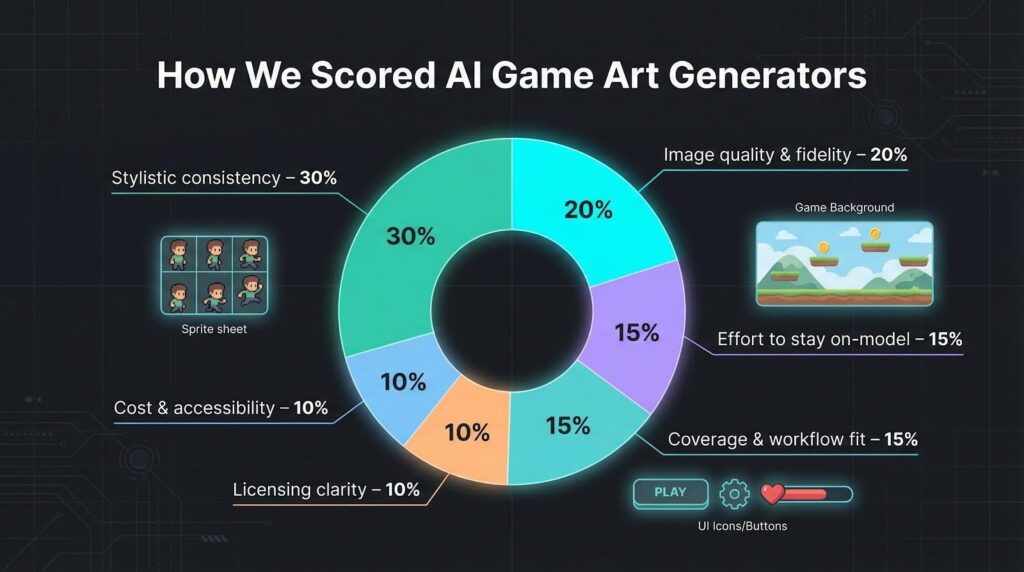
Consistency ranks highest because a beautiful one-off is useless if the sequel looks like a different game. Quality follows; we cut any tool that produced blurry edges or damaged anatomy. Effort measures the hoops you jump through: fine-tuning beats prompt gymnastics.
Coverage checks whether the platform handles sprites and backgrounds without add-ons. Licensing clears legal hazards before launch. Finally, cost answers every indie’s first question: “Can I afford this?”
The leaderboard that follows flows directly from these numbers, so the order earns your trust.
1. Leonardo AI: personal model training in minutes
Leonardo ranks first because it learns your style quickly and keeps it consistent.
Upload five to ten reference images to the Personal AI trainer, wait a few minutes, and receive a custom model that mirrors your line weight, palette, and proportions with surprising accuracy. Feed that model into Leonardo’s text-to-image generator and a single prompt produces dozens of on-model sprites in seconds, combining the speed and consistency your asset schedule demands. In our stress test, faces, armor trim, and accent colors stayed locked from pose to pose, with no manual touch-ups required.
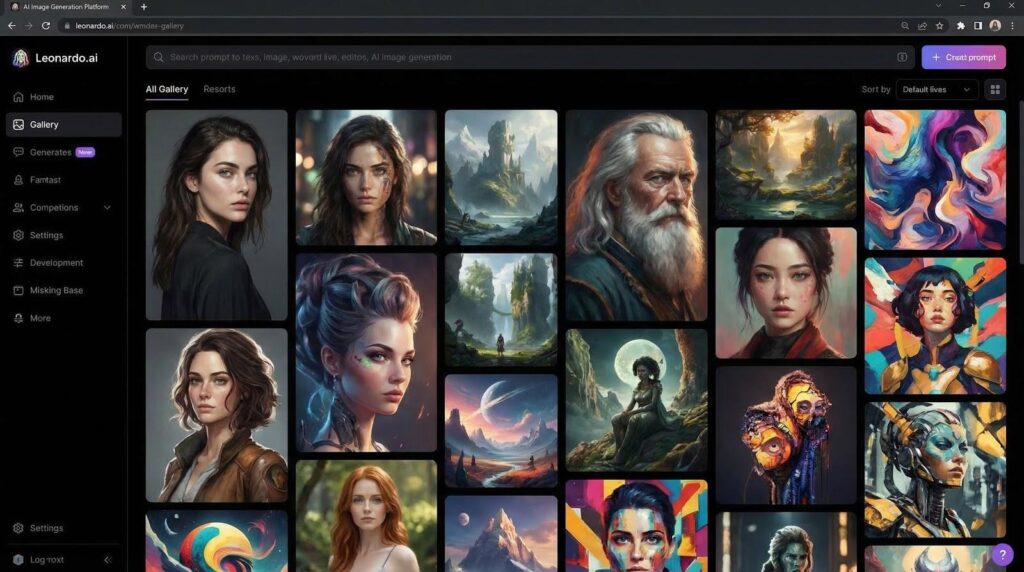
Leonardo AI personal model training and sprite generation interface screenshot
That consistency streamlines production. You can batch-generate 40 sprites, a tileset, and a menu-icon set in one run, then upscale everything with the Alchemy tool. The PNG exports include transparency, so assets drop straight into Unity, Godot, or a no-code builder like AppsGeyser.
Licensing is equally clear. Leonardo grants full commercial rights on every output and still offers 150 daily generations on the free plan, which makes prototyping affordable.
If you need studio-level cohesion without a studio-level budget, begin with Leonardo.
2. Scenario GG: asset packs in your signature style
Scenario works like a private art workshop that understands your visual dialect.
Upload a few concept pieces, tag the project, and click Train. Scenario builds a custom diffusion model that recalls your look on demand: villagers, weapons, and UI icons share the same visual DNA. Because the model lives in a shared workspace, teammates generate new art without drifting off-style.
The browser interface is direct. Choose the model, enter a prompt, and batch-generate items at a fixed resolution. Need a top-down tileset? Enable “tileable,” and Scenario joins the seams. Looking for costume variants? Adjust the Variation slider to spread options while preserving proportions.
Scenario GG AI game asset generator browser workspace screenshot
Outputs arrive as transparent PNG files ready for Unity or Godot. Since you supplied the training data, you own the results. Paid plans begin at 29 dollars a month, and the free tier lets you run a trial project before paying.
If your art bible already defines the look and you need it echoed across hundreds of assets, Scenario multiplies your effort.
3. Stable Diffusion: the open-source Swiss Army knife
Stable Diffusion is not a single app; it is a playground for curious builders. Install Automatic1111 or ComfyUI, add ControlNet, LoRA, or DreamBooth, and you can guide the model into nearly any style: pixel art, comic-book ink, or painterly concept art.
Consistency comes from custom training. Provide twenty reference shots of your main character, create a LoRA, and reuse that adapter in future prompts. Lock the seed, sketch a pose with ControlNet, and the model redraws the hero in perfect alignment with your art bible. The learning curve is real, yet once the workflow settles you own a repeatable, scriptable pipeline.
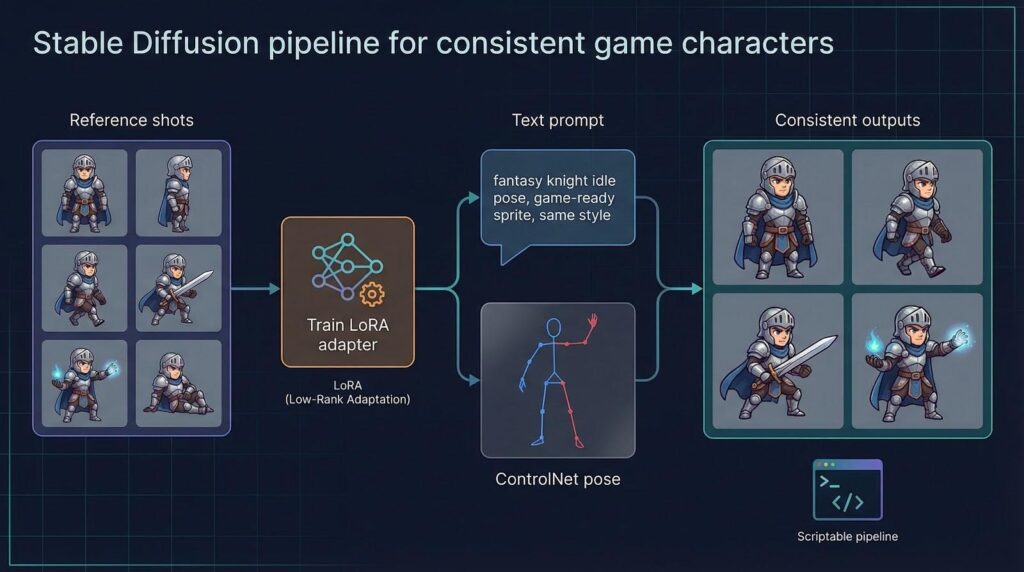
Because the code is open source and the weights carry a permissive CreativeML license, every output is royalty-free for commercial games. Self-hosting removes monthly fees; you only pay for GPU time. Spin up an inexpensive cloud box, batch-generate one hundred icons overnight, and shut it down before breakfast.
If you like to tinker and want full control over style, resolution, and automation, Stable Diffusion returns the effort with broad creative freedom.
4. PixelLab: pixel-perfect sprites at warp speed
Retro charm appears only when every pixel aligns. Feed PixelLab a prompt such as “32×32 knight idle, walk, attack,” and it returns a complete, grid-aligned sprite sheet in seconds.
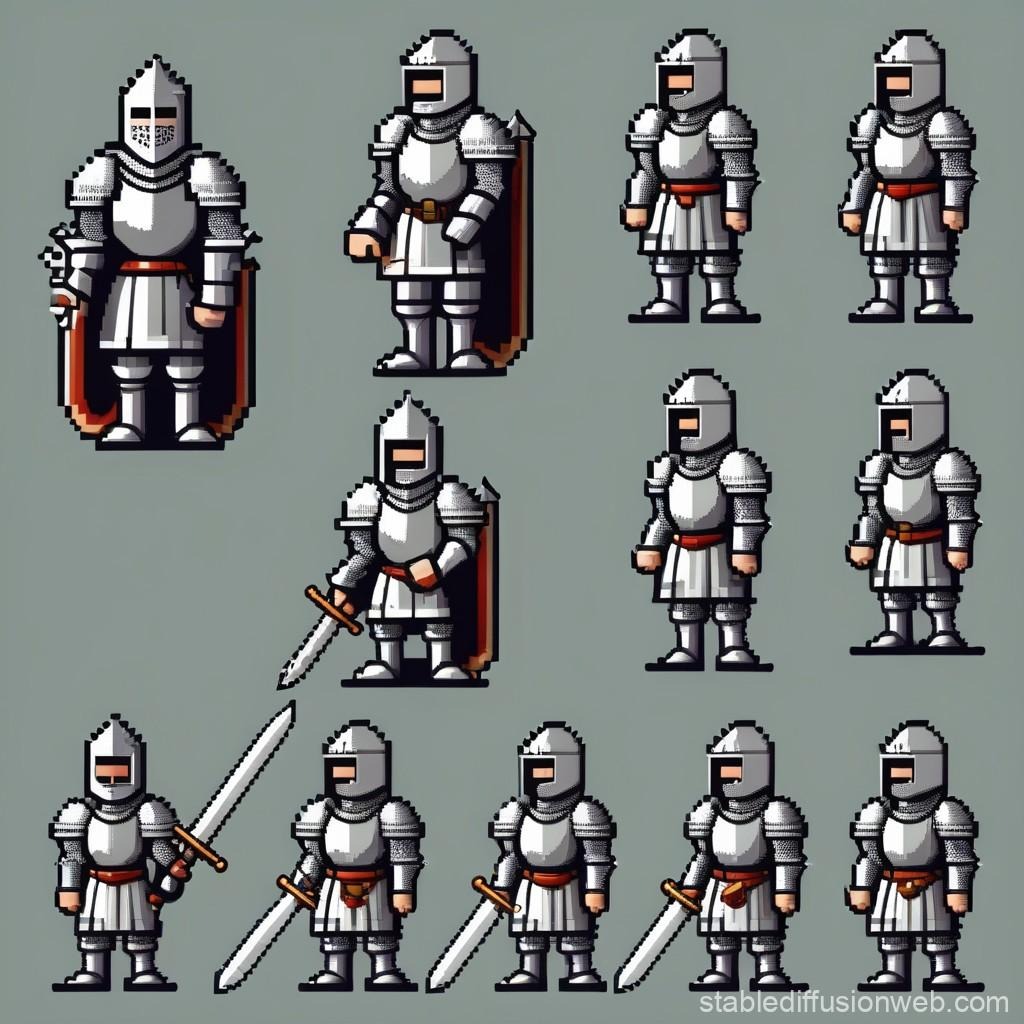
PixelLab pixel art knight sprite sheet official example
Unlike general generators that output blurry mosaics, PixelLab trains on true low-resolution constraints. It preserves palette, perspective, and pixel density across every frame, so a shoulder pad never shifts a pixel during a sword swing. Need a full tileset? Select Tiles, and the tool builds ground, wall, and decorative variations that tile without visible gaps.
The workflow stays smooth. Enter dimensions, pick an animation template, and click Generate. The output arrives as transparent PNG images plus an Aseprite file, ready for quick tweaks or palette swaps. The free trial covers 40 generations—enough to prototype a level—while paid tiers cost less than a single day of contract pixel work.
If your game leans on a classic 8- or 16-bit aesthetic, PixelLab moves you from concept to playable sprite in record time.
5. Midjourney: concept art that impresses, consistency that wobbles
Midjourney feels like an in-house concept artist during the exploration phase. Enter a short prompt, wait a moment, and receive a poster-ready illustration rich in color theory and composition. Few tools spark visual ideas this quickly.
That speed drops once you shift from splash screens to production assets. Midjourney does not store prior images, offers no fine-tuning slot, and treats each prompt as a fresh canvas. Locking the seed helps a little, yet you still spend time matching armor trim or a wandering palette. Plan on manual paint-overs or a second tool if you need more than a handful of on-model sprites.
Workflow quirks add friction. Jobs run inside Discord, so you dig through a chat feed unless you pay for a private channel. There is no official API, which rules out batch pipelines.
Midjourney still earns a place in two scenarios. First, when you need headline marketing art—store icons, splash screens, hero banners—that must capture attention but will not sit beside dozens of sibling assets. Second, as an idea engine: create mood boards, then pass the best results to another generator for consistency and downstream control.
Treat it as an inspired concept artist, not a detail-oriented production assistant, and Midjourney will lift the early creative sprint without derailing your art bible later on.
6. Adobe Firefly: commercial peace of mind inside Photoshop
Firefly serves creatives who live in Creative Cloud and want ironclad licensing. The model trains only on Adobe-owned or licensed images, so every pixel you generate is cleared for commercial use, according to Adobe.
The web interface feels familiar: style presets on the left, a prompt bar on the right, and a large Generate button. To keep assets on-brand, upload a reference image and turn on Generative Match. Firefly studies your sample and applies its palette and brushwork to each new output. It is not as precise as a fully custom model, but it lands surprisingly close for UI icons, props, and background dressing.
Because Firefly sits inside Photoshop, you move from idea to iteration without switching apps. Generate a prop, resize it, run Generative Fill for highlights, and save the layer in the same file. That loop makes polishing a sprite sheet almost as quick as retouching a selfie.
Performance holds up: four variations arrive in under ten seconds, each at 1 024 pixels square. Need higher resolution? Upscale with Photoshop’s Super Resolution feature and keep building. Firefly is included in many Creative Cloud plans, so if you already pay Adobe, the tool joins your pipeline at no extra cost.
7. DALL·E 3: chat-first image generation for rapid iteration
If you like to talk through ideas, DALL·E 3 feels intuitive. Describe a scene in ChatGPT, the model returns four crisp images, and you refine the result with plain conversation. “Make the shield rounder.” “Match the palette to screenshot B.” The exchange mimics briefing an in-house artist.
Quality holds up: sharp lines, balanced compositions, and text that passes for legible signage. Consistency still depends on repetition; DALL·E remembers the current chat but forgets style across new sessions, and it does not allow user-trained models. Reusing exact wording and feeding reference images helps, yet large asset packs will test your patience.
Outputs are royalty-free under OpenAI policy, and you own the images you create. Generate inside ChatGPT Plus or Bing’s Image Creator, download PNG files, and drop them into your engine. For teams that brainstorm visually and need one-off marketing pieces, DALL·E 3 delivers quickly. For high-volume production, pair it with a style-locked generator upstream or downstream.
8. FluxEngine and friends: the emerging edge
New generators appear every quarter, and a few already merit a spot on your watchlist.
FluxEngine tops the list for photorealism. Its images rival high-end concept art, ideal for a gritty, realistic trailer shot. The trade-off is speed and hardware: a single 4K render can take minutes, and the model currently sits behind invite-only services such as Layer.ai. Solid for hero art, less practical for large sprite batches.
PixelVibe, from Rosebud, competes with PixelLab in the retro space. It ships with 15 pre-trained pixel models and hints at one-click game prototyping where art and code grow together. The tool is still in beta but already useful for placeholder packs when funds are low.
For 3-D projects, keep an eye on Meshy and Tripo. Text-to-mesh pipelines remain rough; plan to retopo, re-UV, and refine textures. Even so, they shorten the grey-box phase. Generate a low-poly prop, drop it in Unity, and evaluate fit within minutes.
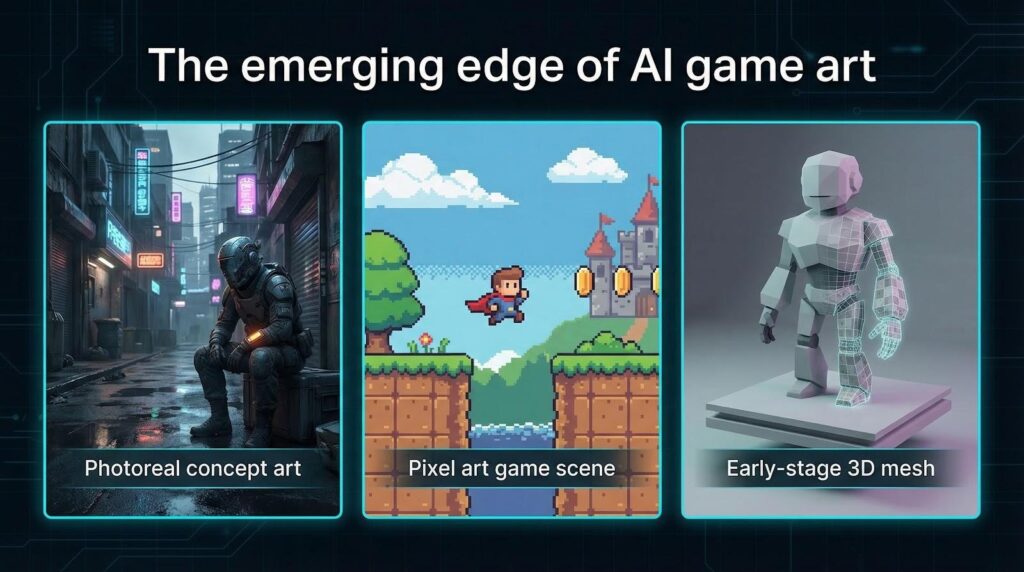
These tools do not yet break into the top tier, but they preview where AI art is heading. Add them to your toolbox now, and you will be ready as they mature.
Key features at a glance
| Tool | Custom style training | Asset types | Batch / animation | Licensing | Free tier | Best use |
| Leonardo | Yes – Personal AI | 2-D, textures, light 3-D | Strong batch | Full commercial, no royalties | 150 gens / day | All-round cohesion |
| Scenario | Yes – project models | 2-D sprites, icons | Batch via UI / API | You own outputs | Limited | Large packs in one style |
| Stable Diffusion | Yes – LoRA / DreamBooth | Any 2-D, pixel art | Scriptable batch | Open-source, royalty-free | N/A | Power users needing control |
| PixelLab | Yes – LoRA pixel | Pixel art, tiles | Sprite sheet auto | Indie-friendly | 40 gens | Retro games fast |
| Midjourney | None | High-res concept art | Manual only | Paid plan required | No | Marketing art, mood boards |
| Adobe Firefly | Reference match | 2-D art, UI | Photoshop loop | Adobe-licensed | CC trial | Safe assets inside CC |
| DALL·E 3 | Chat memory | 2-D scenes | Limited | Royalty-free | Bing credits | Conversational ideation |
| Flux / others | Varies | Photo-real or 3-D | Early stage | Beta terms | Varies | Cutting-edge experiments |
Read the table from top to bottom, then ask yourself: What is my immediate bottleneck?
Conclusion
Quick-pick guide: Match the tool to your use case
- Need reliable style cohesion across hundreds of assets? Train a custom model in Leonardo or Scenario.
- Working in pixel art and rushing sprite sheets? PixelLab turns plain prompts into grid-perfect animations in seconds.
- Have technical skills and want full control with 0 licensing cost? Spin up Stable Diffusion, fine-tune a LoRA, and automate your pipeline.
- Looking for striking marketing art or mood boards for investors? Midjourney produces high-impact visuals in moments.
- Already subscribe to Creative Cloud and want guaranteed copyright safety? Adobe Firefly keeps everything inside Photoshop.
- Brainstorm visually through chat and iterate live with stakeholders? Open DALL·E 3 in ChatGPT and refine each draft in conversation.
- Exploring photoreal concepts or experimental workflows? FluxEngine and similar newcomers belong in your R&D folder until they mature.
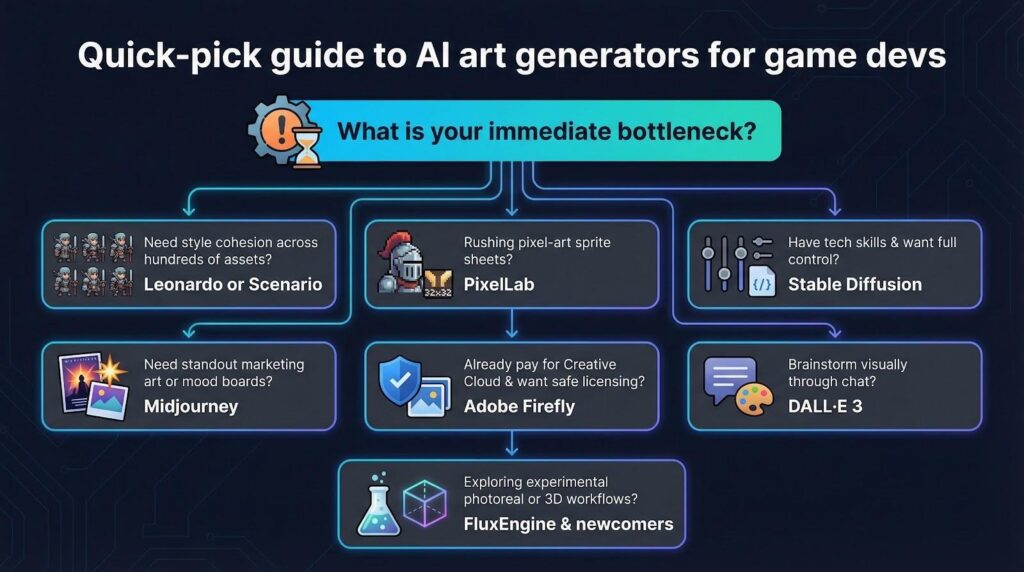
Keep this checklist nearby. It saves hours of trial and error and channels your budget toward the tool that removes today’s biggest barrier.