
Best AI Video Generators in 2025
Let’s be real – video creation has always been a pain. You needed scripts, lighting, expensive editing software, and a lot of time. But now? AI has flipped the game.
In 2025, there are tools that can turn your ideas into finished clips – no editing chops required. Whether you’re an indie creator, brand marketer, or just experimenting for fun, these tools can help you create faster, easier, and cheaper.
I’ve tested a ton. Here are the ones actually worth your time.
Quick Summary Table: Best AI Video Generators
|
Tool |
Best For |
Key Feature |
|
Fast, creative edits |
Face swap, stylization, video-to-video – all free to try | |
|
Marketers, content teams, and educators needing sleek |
Auto-generation of full-length animated videos — including visuals, narration, and soundtrack | |
|
Storytelling with style |
Cinematic text-to-video with camera control | |
|
Editing-focused pros |
Gen-2 video + inpainting, motion tools | |
|
Business explainers |
AI avatars in 120+ languages | |
|
Multilingual creators |
Face + voice swap in one click | |
|
Music visuals |
Audio-reactive animation | |
|
Social ads & promos |
Business templates with drag-and-drop UI |
What Makes a Great AI Video Generator?
A great AI video tool in 2025 doesn’t just create footage – it saves you time and gives you control without a learning curve. Here’s what I looked for:
- Fast idea-to-video workflow
- Clean, usable output with no weird artifacts
- Easy-to-use interfaces (no-code or low-code)
- Flexibility: text-to-video, editing, stylization, and more
You can upload a clip and instantly AI morph it into claymation, anime, or painterly styles. It’s perfect for early concept testing or just giving existing footage a unique spin.
1. DomoAiApp
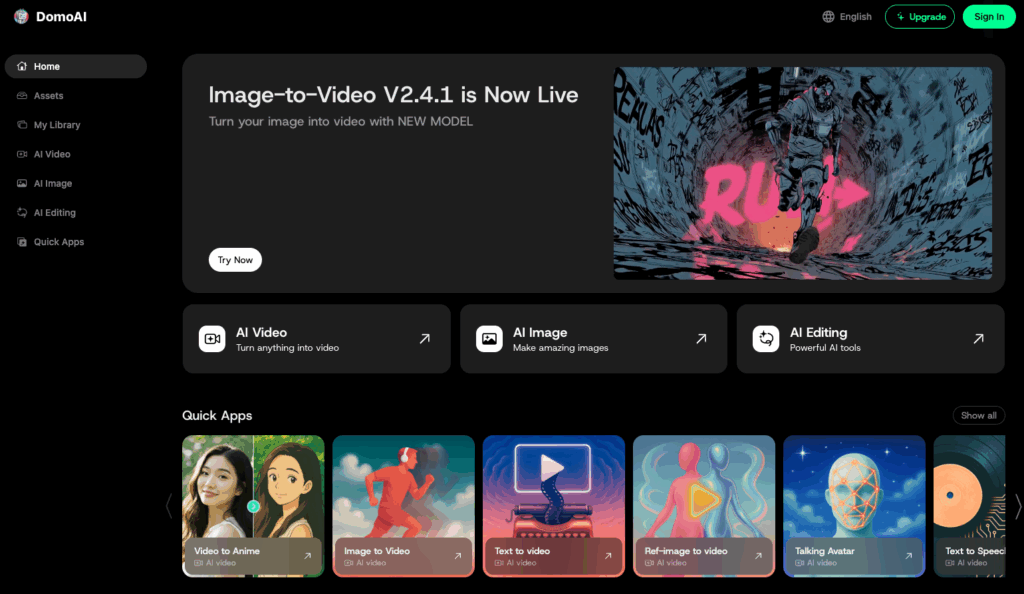
Best for: Creators who want stylized animations, anime-inspired visuals, and viral-ready social content.
Key Features
- Multiple animation styles: Japanese anime, Ghibli-style art, hyper-realistic looks, and more
- Viral motion templates: AI Kiss, AI Hug, dynamic dances, and trending motion presets
- Character-to-video animation: Turn any character or photo into a fully animated performance
- 4K upscaling: Sharpen your visuals with high-resolution output
- Complete creative suite: Generate → Animate → Add voices → Apply style transfer → Upscale
- Relax Mode: Unlimited generations for high-volume creators
Why It Stands Out
DomoAIApp is the all-in-one AI animation studio that Veo 3 simply isn’t trying to be. While Veo 3 aims for photorealistic, audio-free generations, DomoAIApp focuses on expressive, stylized, and highly shareable content. You can transform any image or video into polished anime scenes, dreamy Ghibli-inspired sequences, or viral social animations in seconds.
Its library of motion templates,like AI Kiss, AI Hug, and trending dances—lets you instantly recreate popular formats, while custom motion uploading means any character can mimic any movement. Combined with talking avatars, style transfer, and true 4K upscaling, DomoAIApp gives creators a fully integrated pipeline from concept to final export.
Where Veo 3 has limited-access rollout, DomoAIApp is built for daily creative output. With Relax Mode, subscribers can generate unlimited content without worrying about credits or caps.
Pricing
Free plan with limited credits available.
Paid plans start at $9.99/month, including Relax Mode for unlimited generations.
2. Freepik AI Video Generator (Marketers, content teams, and educators needing sleek)
Freepik’s AI Video Generator empowers creators to produce visually rich, animated videos from simple text prompts in just moments. Powered by AI and integrated with Freepik’s expansive visual asset library, it delivers smooth transitions, AI voiceovers, and mood-matching music — all intelligently aligned with your script. Whether you’re building a pitch, launching a product, or creating educational content, this tool ensures your message is transformed into engaging video, effortlessly.
Pricing:
- Free tier with watermark and export limits.
- Premium from €9.99/month: watermark-free HD downloads, faster rendering, and full asset access.
Pros:
- Exceptionally intuitive — ideal for non-designers and small teams.
- Professional-grade outputs styled with Freepik’s renowned design aesthetics.
- Seamless access to Freepik’s vast stock image and video library.
- Ideal for quick iteration and scalable content creation.
Cons:
- Less granular control than advanced editors (e.g., After Effects).
- AI voice quality can be hit-or-miss in certain tones or languages.
- Best suited for videos under ~2 minutes.
3. Pika Labs (Best for Text-to-Video Animation)
Pika lets you go from text to trailer-like clips in seconds. Just describe your scene – it’ll generate moody, cinematic footage with smooth motion and sharp lighting. Great for creators who want quick visual storytelling.
Pricing: Free + $10/month Pro
Pros:
- Realistic motion & effects
- New tools for camera angle control
Cons:
- Max 3-4 seconds per render
- Slow processing during high traffic
4. Runway ML (Best for AI-Powered Editing)
Runway is a hybrid between AI generation and traditional editing. It lets you edit, replace, or add objects in video using Gen-2 – while also providing an intuitive timeline editor.
Pricing: From $12/month
Pros:
- Fine-grained control for serious creators
- Inpainting, motion brush, more advanced tools
Cons:
- Less beginner-friendly
- Output quality can vary depending on task
5. Synthesia (Best for AI Avatars)
Want to make a product demo in 5 languages? Synthesia gives you realistic AI presenters to speak your script. It’s B2B-focused and perfect for internal training, corporate videos, and education.
Pricing: Starts at $22/month
Pros:
- High-quality avatars
- Multilingual voiceovers
Cons:
- Avatar format only (limited visuals)
- Feels robotic if not styled well
6. HeyGen (Best for Face Swapping and Dubbing)
HeyGen’s AI avatars are next-level. Record once, and the tool can lip-sync and dub your video into multiple languages. It’s huge for content creators going global.
Pricing: Free trial, $29/month plans
Pros:
- Face + voice swaps in one tool
- Very realistic dubbing quality
Cons:
- Longer render times
- Free tier adds watermark
7. Kaiber (Best for Music Visuals)
Kaiber shines for music-driven animation. Upload audio and an image, and it’ll generate a motion-reactive video that syncs with your beat. Great for artists, YouTubers, and Spotify Canvas.
Pricing: Starts at $5/month
Pros:
- Creative control with style presets
- Reactive animation to match your track
Cons:
- Clips are short
- Limited for non-music creators
8. Animoto (Best for Business Templates)
If you want simple promo videos, Animoto does the job. Choose a template, drop in your content, and export something slick. Think slide decks turned into social-ready video.
Pricing: Free tier, Pro from $15/month
Pros:
- Clean business templates
- Fast, no-fuss editing
Cons:
- No AI generation from scratch
- Feels a bit old-school vs. newer tools
Final Thoughts
You don’t need a video editor anymore – just an idea and the right tool. Whether you’re experimenting with visual storytelling or producing content at scale, there’s an AI tool that can help.
Start here:
- Runway if you want editing precision
- Synthesia and HeyGen for brand comms
- Pika for cinematic storytelling
2025 is the year to stop watching and start creating.