
How to Turn Your Replit Project Into a Mobile App
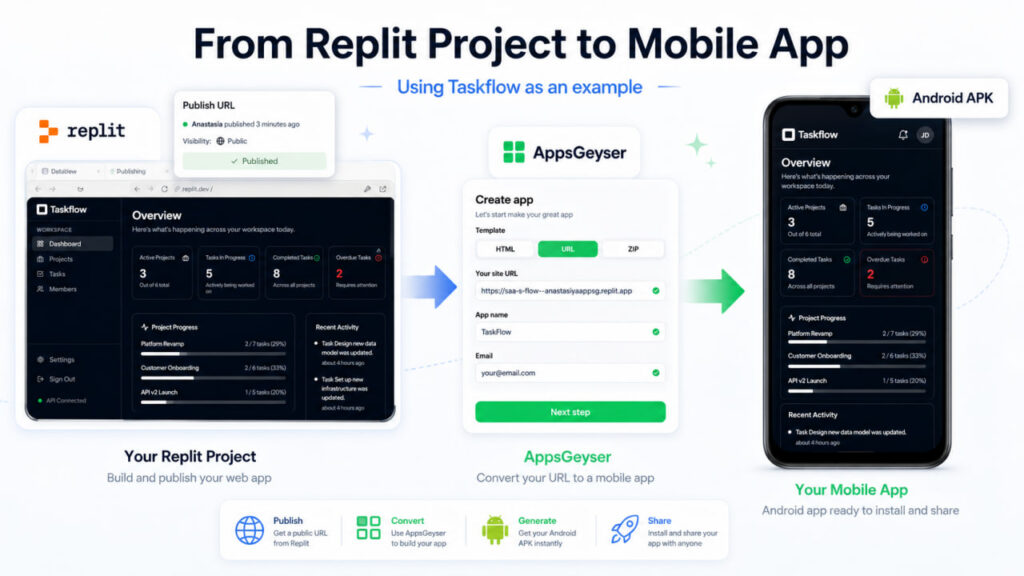
Replit is one of the easiest places to build and test a web project. You can create a small tool, dashboard, AI app, calculator, task manager, portfolio, or MVP directly in your browser without setting up a local development environment. But after the project works, the next question is simple: how do you turn it into something users can open from their phone like a real app?
The good news is that many Replit projects can become mobile apps without rewriting the entire codebase. If your project is already published online and works well on a mobile screen, you can use its public URL as the source for an Android app.
In this guide, you’ll learn how to turn a Replit project into a mobile app, what kind of projects work best, how to prepare your app before conversion, and how to generate an Android APK with AppsGeyser. For the step-by-step AppsGeyser walkthrough, we’ll use Taskflow — a sample Replit project management dashboard with projects, tasks, members, progress tracking, and recent activity.
Quick Answer: Can You Turn a Replit Web App to a Mobile App?
Yes. You can turn a Replit project into a mobile app by publishing the project, copying its public URL, and using AppsGeyser to package the web app as an Android APK. The basic workflow is: build in Replit, test the project on mobile, publish it, paste the URL into AppsGeyser, generate the APK, and test the app on an Android device.
This method works best when your Replit project is already a web app that loads correctly in a mobile browser. You do not need to rebuild it in Android Studio or rewrite the whole project in a native mobile framework.
What Does “Replit to Mobile App” Mean?
The phrase “Replit to mobile app” can mean two different things. Before choosing a workflow, it is important to understand the difference.
Option 1: Build a Native Mobile App With Replit Tools
Replit can be used to build mobile projects with modern frameworks and AI-assisted development. This route is useful if you want to create a mobile-first app from the beginning, work with tools like Expo, or build a more native app experience.
This path is more technical. It may require knowledge of mobile frameworks, app store requirements, testing tools, and native app publishing workflows.
Option 2: Convert an Existing Replit Web App Into an Android App
The second option is simpler. If you already have a Replit project that works as a website or web app, you can convert that live project into an Android app.
This is the workflow we’ll focus on in this article. Instead of rebuilding the project from scratch, you publish your Replit project, copy the public URL, and use AppsGeyser to turn that URL into an installable Android APK. The app opens from the user’s phone like a regular mobile app, while your Replit project remains the source of the app content.
Which Option Should You Choose?
| Situation | Best Option |
| You already have a working Replit website or web app | Convert the URL into an Android app |
| You want a quick APK for testing or sharing | Use AppsGeyser |
| You do not want to install Android Studio | Use AppsGeyser |
| You need deep native mobile features | Consider a native rebuild |
| You are building an iOS-first native app | Use a native mobile workflow |
| You want to turn an MVP into a mobile app quickly | Convert your Replit URL |
For many creators, students, small businesses, and indie developers, the URL-to-app method is the fastest way to move from a Replit project to a mobile app.
What Types of Replit Projects Can Become Mobile Apps?
Not every Replit project is ready to become a mobile app immediately. The best candidates are projects that already behave like mobile-friendly web apps.
Best Replit Projects for Mobile App Conversion
A Replit project is a good fit for conversion if it has a clear interface and can be used on a phone. Examples include:
- task trackers
- calculators
- AI tools
- dashboards
- booking forms
- educational apps
- quiz apps
- portfolio websites
- small business tools
- directories
- simple SaaS projects
- internal team tools
- content-based apps
- HTML/CSS/JavaScript apps
- React or Vite web apps
- Node.js web apps with a frontend
If users can open the project in a mobile browser and complete the main action, it may be a strong candidate for an Android app.
Projects That May Need Extra Work First
Some Replit projects should be improved before you convert them into an app. For example:
- desktop-only layouts
- pages with small buttons or hard-to-tap elements
- apps that require a private Replit preview link
- projects that are not publicly published
- apps that depend on browser extensions
- tools with broken mobile navigation
- projects with pop-ups that do not work well on mobile
- apps with forms that are difficult to complete on a phone
- pages that load slowly on mobile internet
- projects without a privacy policy when user data is collected
If your project is not mobile-friendly yet, fix the web version first. The Android app will reflect the experience of the published Replit project.
How to Turn a Replit Project Into a Mobile App With AppsGeyser
Now let’s walk through the practical process.
For this example, we’ll use Taskflow, a sample project management dashboard built in Replit. The app includes a workspace dashboard, active projects, tasks in progress, completed and overdue tasks, project progress bars, and recent activity.
This is only an example. The same workflow can be used for many other Replit projects, including calculators, dashboards, AI tools, business apps, educational tools, booking forms, portfolios, directories, and small SaaS projects.
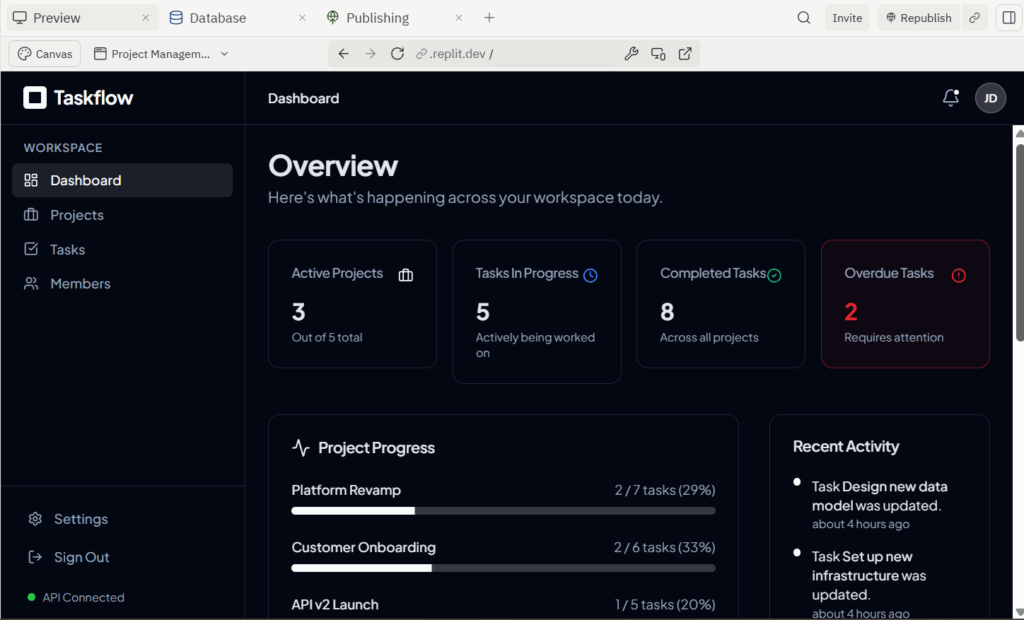
Step 1: Publish Your Replit Project
Open your project in Replit and make sure it runs correctly in the preview. Test the main features before moving forward.
For the Taskflow example, open the project in Replit and check that the main dashboard loads correctly. Test the sidebar navigation, dashboard cards, project progress section, recent activity block, and any task or project screens before creating the mobile app.
After testing, publish or deploy the project so it has a public URL. This public URL is what AppsGeyser will use to create the Android app.
Step 2: Copy the Public Replit URL
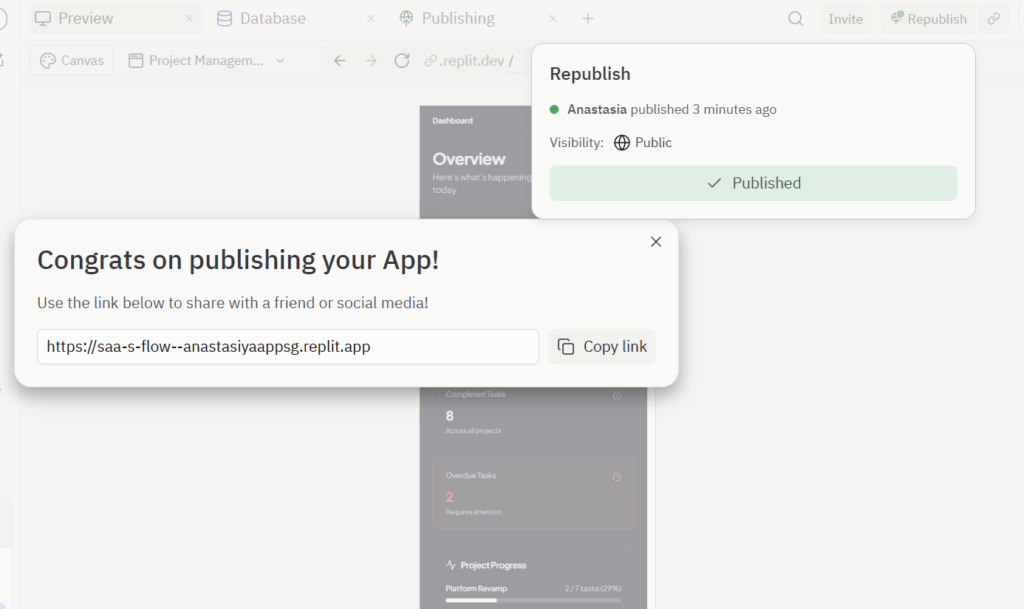
Copy the URL of the live Replit project. Make sure you use the public app URL, not the private editor URL.
A good test is to open the link in a new browser or incognito window. If the project loads without requiring access to your Replit account, you have the correct URL.
For the Taskflow example, open the public Replit link on your phone. If the dashboard loads correctly, the navigation is usable, the cards fit the screen, and the project sections are easy to read, the project is ready for conversion.
Step 3: Open AppsGeyser Website App Maker
Go to AppsGeyser and open the Website App Maker. This tool lets you turn a web project into an Android app without writing mobile code. It is useful when your Replit project is already online and you want to make it installable as an APK.
Step 4: Paste Your Replit Project URL
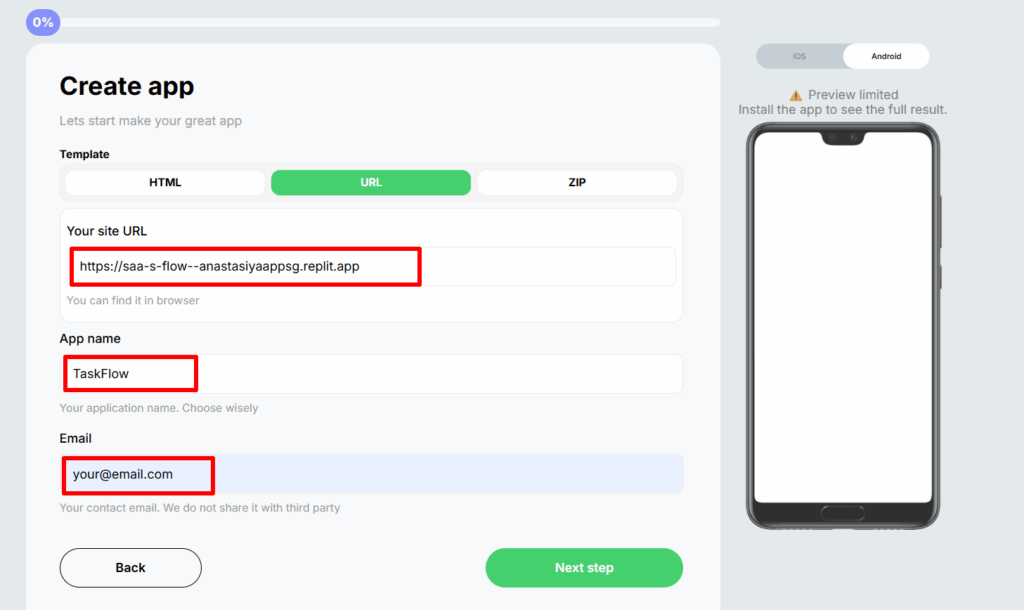
Paste the public Replit URL into AppsGeyser. This URL becomes the source of your Android app. In the Taskflow example, the Android app will display the same project management dashboard that users see in the live Replit version. This means your Replit web project becomes accessible from a phone home screen as an installable app. Make sure the URL starts with HTTPS and opens the live project directly.
Step 5: Add Your App Name, Icon, and Settings
Next, add the basic app details. For the example project, the app name can be Taskflow. You can also use a clearer descriptive name, such as Project Management App, Team Dashboard, Workflow Tracker, or Project Tracker. Choose an icon that is simple and readable. For a project management dashboard, a square checkbox, dashboard grid, or workflow symbol works well.
Step 6: Generate Your Android APK
After setup, AppsGeyser generates an Android APK. An APK is an Android application package file. You can install it on an Android device for testing or use it as part of your app distribution workflow. For the Taskflow example, this means the project can be opened from the phone’s home screen like a regular app. Users do not need to type the Replit URL into a browser every time.
Step 7: Install and Test the App on Your Phone
After generating the APK, install it on an Android phone and test the main user flows. If something does not work in the APK, open the same Replit URL in a mobile browser. If the problem appears in both places, fix the issue in Replit first. Then update the published project and test again.
For the Taskflow example, test the following:
- open the app from the home screen
- check whether the dashboard loads quickly
- test sidebar navigation
- open Projects, Tasks, and Members sections
- check active projects, tasks in progress, completed tasks, and overdue tasks
- review project progress bars
- check the recent activity section
- test buttons, cards, and forms
- check whether the layout fits the phone screen
- test the Android back button
- close and reopen the app
- test the app on mobile internet, not only Wi-Fi
Replit Web App vs Android APK: What Changes?
Turning your Replit project into an APK changes how users access and experience the project.
| Feature | Replit Web App | Android APK |
| Access | Browser link | Installed app |
| Home screen icon | Usually no | Yes |
| Browser address bar | Visible | Hidden |
| User perception | Website or web tool | Mobile app |
| Distribution | Share a URL | Share APK or publish |
| Updates | Update Replit project | App loads updated URL |
| Best for | Testing, sharing, web access | Repeat mobile usage |
The core project may remain the same, but the user experience changes. An installed app feels easier to return to, especially for tools that people use more than once.
Why Convert a Replit Project Into a Mobile App?
There are several reasons to turn a Replit project into a mobile app instead of leaving it only as a web link.
Easier Access From the Home Screen
A mobile app gives users a clear icon on their phone. They can open it directly without searching for a link, checking messages, or typing a URL.
This is especially useful for apps people use often, such as task trackers, calculators, dashboards, study tools, or business utilities.
Better Experience for Repeat Users
If your Replit project solves an ongoing problem, users may need to return to it regularly. A mobile app makes that habit easier.
More Professional MVP Presentation
A Replit link is useful for testing, but an app can look more polished when you present an idea to users, clients, students, or stakeholders.
Faster Testing With Real Android Users
An APK lets you test your project with real users on real devices. You can see how the app performs on different screen sizes, networks, and Android versions.
A Practical Path From AI-Built Project to Mobile App
Many creators now use AI tools and browser-based coding platforms to build projects quickly. Replit can help you create the first working version. AppsGeyser can help you package that project into an Android app so users can install and test it.
This creates a simple path: Idea → Replit project → published URL → AppsGeyser APK → Android app.
Common Problems When Converting Replit Projects to Mobile Apps
Most issues come from the original web project, not the conversion itself. Here are common problems and how to fix them.
The Replit App Does Not Open Inside the APK
Possible reasons include an unpublished project, the wrong URL, private account access, app sleep, redirects, or authentication issues. Open the Replit URL in incognito mode. If it does not load there, fix the public access settings first.
The Layout Looks Bad on Mobile
Possible reasons include fixed-width containers, desktop-only navigation, small text, crowded buttons, wide tables, and pop-ups that do not fit mobile screens. Update the Replit project with responsive CSS and test different mobile screen sizes.
Login or Signup Does Not Work
Possible reasons include OAuth redirect problems, blocked pop-ups, cookie/session issues, a mobile-unfriendly login page, or external authentication opening incorrectly. Test the full login flow on a phone browser first.
External Links Open Incorrectly
Some apps include links to documentation, payment pages, social media, or external tools. Decide whether these links should open inside the app or in the external browser. Check every important link during testing.
The Mobile App Feels Slow
Possible reasons include large images, heavy JavaScript, unoptimized animations, slow backend responses, too many third-party scripts, or poor mobile network performance. Compress images, remove unnecessary scripts, reduce heavy UI effects, and test performance on mobile internet.
AppsGeyser vs Rebuilding the App From Scratch
Converting a Replit project into an Android app is not the same as rebuilding it as a fully native app. Both options have their place.
When AppsGeyser Is a Good Choice
- your Replit project already works as a web app
- you need an Android APK quickly
- you want to test an MVP
- you do not want to use Android Studio
- you do not want to rewrite your codebase
- your app is mostly content, dashboard, form, tool, calculator, or web-based interface
- you want a simple way to package a URL into an Android app
For many early-stage projects, this is the fastest practical route.
When a Native Rebuild May Be Better
A native rebuild may be better if your app needs:
- advanced offline functionality
- complex background processing
- deep native device features
- high-performance mobile gaming
- advanced camera or sensor control
- a fully custom iOS and Android codebase
- complex app store-specific behavior
If you are still testing the idea, start simple. If the app grows and needs deeper native functionality, you can decide later whether to rebuild.
Example Workflow: From Replit Project to Android APK
Here is the full workflow in one place:
- Build your project in Replit.
- Make sure it works on mobile screens.
- Publish or deploy the project.
- Copy the public Replit URL.
- Open AppsGeyser Website App Maker.
- Paste the Replit project URL.
- Add your app name and icon.
- Generate the Android APK.
- Install the APK on an Android phone.
- Test the main user flows.
- Fix any issues in Replit.
- Prepare the app for sharing or publishing.
For the Taskflow example, the final result is an Android app that opens directly from the phone home screen and lets users access the project management dashboard without typing the Replit URL.
Video Tutorial: Replit to Mobile App
You can also follow this process in a video tutorial.
FAQ
Can I turn a Replit project into a mobile app?
Yes. If your Replit project is published and works through a public URL, you can turn it into a mobile app using a web-to-app builder such as AppsGeyser.
Can I convert a Replit project to APK?
Yes. AppsGeyser can help convert a public Replit project URL into an Android APK without Android Studio or manual mobile coding.
Do I need to rewrite my Replit project in React Native?
Not always. If your project already works well as a mobile-friendly web app, you can package it as an Android app instead of rebuilding it from scratch.
What Replit URL should I use?
Use the public URL of the published Replit project. Do not use the private editor URL or a preview link that only works inside your Replit account.
Will my app update when I update the Replit project?
If the Android app loads the live Replit URL, updates to the published Replit project can appear in the app after the project is updated and republished.
Can I use this method for AI-built Replit projects?
Yes. If an AI-built Replit project is published, mobile-friendly, and available through a public URL, it can be used as the source for an Android app.
Is the result a native app or a webview app?
This method packages your web project into an installable Android app. It is different from rewriting the project as a fully native Android or iOS app.
Can I publish the app on Google Play?
Yes, but the app must meet Google Play requirements, including content quality, privacy policy, app functionality, app testing, and proper user data disclosures.
What should I test before publishing?
Test loading speed, mobile layout, buttons, forms, login, external links, navigation, data saving, and the main user flows of your Replit project.
Can I turn a Replit project management dashboard into an Android app?
Yes. If your project management dashboard is published as a public Replit web app and works well on mobile screens, you can convert it into an Android APK with AppsGeyser.
Conclusion
Replit is a great place to build and test web projects quickly. But once your project works, it does not have to stay only as a browser link. If the project is public, responsive, and useful on mobile, you can turn it into an Android app with AppsGeyser.
The process is simple: publish your Replit project, copy the public URL, paste it into AppsGeyser, add your app details, generate the APK, and test it on a real Android device. Whether you built a project management dashboard like Taskflow, an AI tool, calculator, booking form, portfolio, educational app, or small SaaS project, this workflow can help you move from a Replit project to a mobile app faster.