AI Text-to-Image Models: Do You Know Them All?
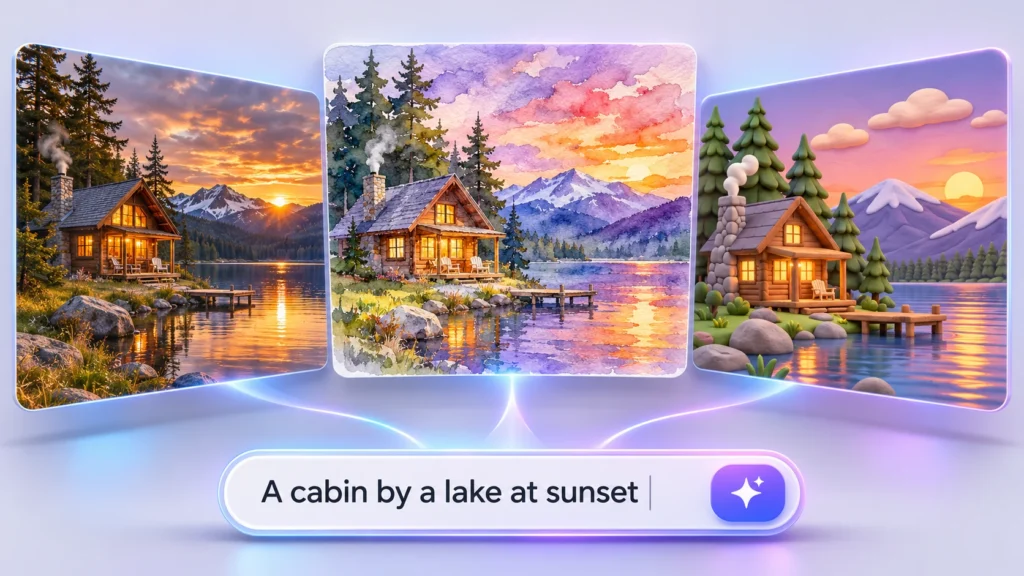
A detailed image prompt can produce very different results depending on which AI model you use. One might create a photorealistic product shot, another might handle text in a promotional poster more accurately, while a third could be better suited to illustrations or experimental artwork. With new models appearing regularly, keeping track of their strengths has become a challenge for designers, marketers, and content creators.
Understanding a few leading options is a useful starting point. The next step is knowing how to choose the right model for each project, without spending time managing multiple platforms and subscriptions.
What Are AI Text-to-Image Models?
Text-to-image models are generative AI systems that turn written prompts into images. You describe the subject, composition, setting, lighting, colours, and visual style, and the model uses those instructions to produce a visual.
However, different models interpret prompts differently. Some prioritize realistic textures and lighting, others focus on typography or graphic design, and some offer more control over complex scenes. The model you choose can affect how closely the output matches your brief, how much refinement it needs, and whether it is suitable for professional use.
4 AI Text-to-Image Models to Know
Here are four notable models worth understanding.
GPT Image
OpenAI’s GPT Image family is designed to generate and edit images from natural-language instructions. It is useful when a prompt includes several connected requirements, such as a particular setting, product placement, lighting direction, and text within the composition.
For example, a marketer creating a product advertisement could describe the packaging, background, camera angle, and headline in one prompt. The model can interpret these instructions together to produce a starting visual. Its image-editing capabilities also make it useful for refining existing outputs rather than beginning again every time.
GPT Image is worth considering for marketing creatives, product concepts, illustrations, and other projects where following detailed instructions matters. The amount of refinement required will still depend on the complexity of the image and the accuracy needed.
Google’s Nano Banana
Google’s Nano Banana image-generation family is designed for creating and modifying visuals through prompts. Depending on the version, it can support tasks such as generating new images, editing existing pictures, and maintaining visual consistency across variations.
That consistency can be valuable when a campaign needs several related assets. Imagine a brand developing a series of promotional images featuring the same product or character. A model that can use reference images and preserve important visual characteristics helps the team create variations without making every image feel unrelated.
Nano Banana is a useful option for product imagery, campaign concepts, and creative workflows that combine image generation with iterative editing. Different versions offer different capabilities, so it is worth checking the supported resolution, reference-image options, and editing features before choosing one.
FLUX
Developed by Black Forest Labs, FLUX is a family of image-generation models used for producing detailed visuals from prompts. Different versions cater to different needs, from rapid experimentation to more polished output.
FLUX can be useful when composition, lighting, colour, and visual detail are important to the brief. A designer might use it to develop a cinematic landscape, create a product concept against a carefully described background, or test different art directions for a campaign.
The family includes variants designed around different balances of speed, quality, and creative control. This makes it important to choose the version that fits the task rather than assuming every FLUX model behaves identically. A fast model may be sufficient for exploring ideas, while a more advanced version may be better suited to a final visual that requires greater detail.
Ideogram
Ideogram is particularly relevant when images need to incorporate readable text. Text has traditionally been a difficult element for image-generation systems, especially when the visual contains headlines, labels, or multiple words that must appear in the correct order.
A typography-focused model can be helpful when creating poster concepts, promotional graphics, social media creatives, or packaging mockups. For example, a designer could generate a poster with a prominent headline and supporting visual elements, then refine the composition to fit a campaign’s intended look.
Ideogram also supports a range of visual styles, so its use is not limited to text-heavy designs. As with other generative tools, however, generated lettering should be checked carefully before an image is published or sent to print.
These four options illustrate why no single model is automatically the best choice for every project. The most suitable one depends on whether you need realistic imagery, consistent variations, detailed compositions, or strong typography.
How to Choose the Right Text-to-Image Model
Start with the image’s intended purpose rather than choosing a model simply because it is popular. A product photograph, a stylized illustration, and a poster with a long headline have different requirements.
Consider these factors before generating an image:
- Prompt accuracy: Can the model follow instructions about composition, object placement, lighting, and other details?
- Visual style: Does it produce the realism, illustration style, or artistic treatment the project requires?
- Text rendering: If the image contains words, can the model render them clearly and accurately?
- Consistency: Can it maintain the appearance of a product, character, or visual identity across multiple assets?
- Resolution and speed: Does it provide output suitable for the final format, and can you generate variations efficiently?
- Cost and licensing: Does the pricing suit your expected volume, and do the usage terms cover your intended project?
It also helps to test the same prompt across more than one model. Compare the composition, detail, accuracy, and amount of editing required. A visually impressive result is not necessarily the most useful one if it misses an important instruction or requires extensive correction.
Explore AI Text-to-Image Models in One Place
Choosing the right text-to-image model often means testing different tools to see which best matches your prompt, visual style, and output requirements. Artlist makes this process easier by bringing a broad selection of AI models into one platform, allowing creators to compare different approaches without constantly switching between separate services.
For text-to-image creation, Artlist AI models include options such as GPT Image, Nano Banana, FLUX, Ideogram, Recraft, and Seedream, alongside Artlist Original. Their different capabilities make them useful for a range of visual projects, from realistic product imagery and detailed compositions to typography-led posters, illustrations, and stylized campaign graphics. Rather than relying on a single model for every brief, creators can select one that better fits the intended result.
For example, a marketer developing a product campaign might need a realistic hero image for a landing page and a more expressive illustration for social media. With multiple text-to-image models available in one place, they can experiment with different prompts and visual approaches to create assets suited to each channel.
The workflow is straightforward: write a prompt describing the desired image, choose a model, adjust the available settings, and generate the result. If the output does not match the brief, refine the prompt or try another model.
For creators who need to experiment with multiple concepts and variations, Artlist also offers unlimited generations on selected models with eligible plans. Once the monthly fast-generation allowance is used, supported generations can continue at standard speed, subject to fair-use limits and plan restrictions. This gives creators more room to test ideas and refine visuals without using credits for every eligible generation.
Keep Experimenting With New Models
Text-to-image AI is not a single technology with one predictable result. Each model has its own strengths, limitations, and approach to interpreting prompts. Learning a handful of leading options can help you get started, but testing alternatives is often the best way to identify what works for a particular project.
Instead of chasing every new release, focus on the features that matter to your workflow: image quality, prompt accuracy, style, consistency, speed, and licensing. Access to a broad selection of models makes that comparison easier and gives you more room to experiment as your creative needs change.