
7 Best AI UI Design Tools for App Creators
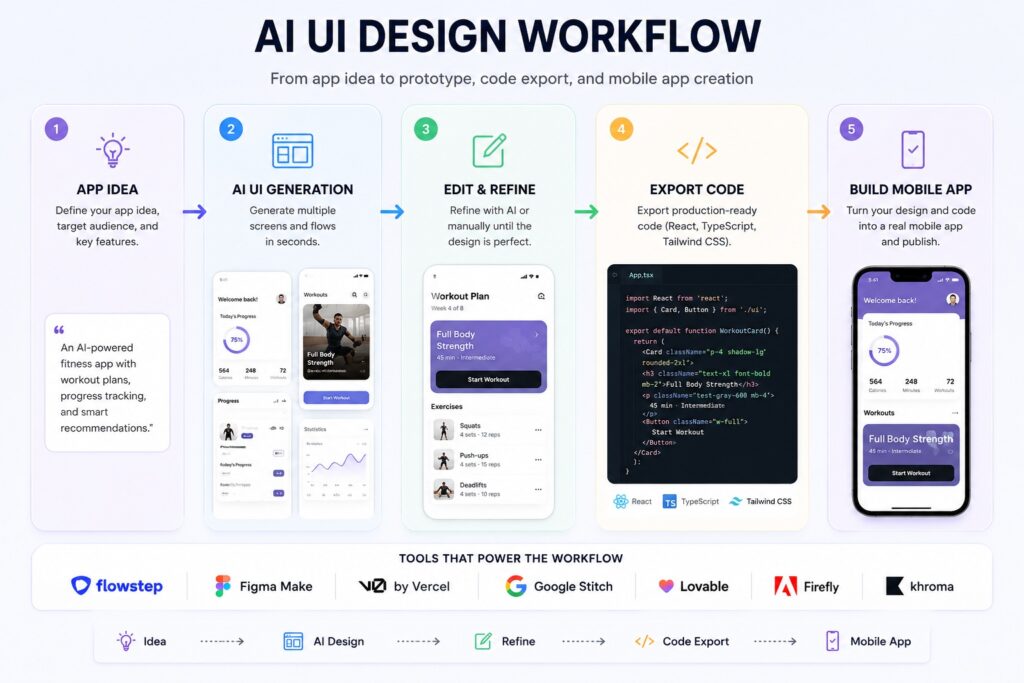
AI UI design tools have changed how app creators move from idea to interface. Instead of opening a blank canvas, you can now describe a product, generate app screens, refine layouts with AI, export code, or move the design into Figma for final editing.
For founders, developers, product managers, and no-code creators, the best AI UI design tools in 2026 are not just mockup generators. The strongest platforms help with real app workflows: multi-screen generation, design-to-code export, Figma handoff, interactive prototypes, visual assets, and faster product validation.
If you use an app builder or plan to create a mobile app, these tools can help you define the user interface before you move into development, website-to-app conversion, or APK generation. Below are seven AI UI design tools worth considering in 2026, starting with Flowstep – the strongest option for teams that want design and code to stay connected from the first prompt.
1. Flowstep
Best for: AI-powered app UI design, multi-screen generation, Figma handoff, MCP workflows, and production-ready code.
Flowstep is one of the strongest AI UI design tools for teams that want to move from product idea to usable interface without separating design from development. Instead of generating a static mockup that later has to be rebuilt by engineers, Flowstep works as an AI design engineer: the visual canvas and the code are part of the same workflow.
With Flowstep, you can describe an app idea and generate several connected screens at once, such as onboarding, login, dashboard, settings, and profile pages. This makes it especially useful for product teams, startup founders, and developers who need to explore a complete app flow rather than a single isolated screen.
The tool also supports both AI-guided and manual editing. You can ask AI to adjust a layout, rewrite a section, change a visual direction, or improve a component, then fine-tune the result directly on the canvas. This makes the workflow flexible: AI gives you speed, while manual control keeps the design specific.
Another major advantage is Figma handoff. Flowstep lets you copy designs from the canvas and paste them into Figma as editable layers, without relying on a separate plugin. For teams that still use Figma for review, collaboration, or final polish, this removes a common handoff step.
Flowstep can also use references such as screenshots, URLs, and design documentation to guide the output. That means you can give it a visual direction or product brief instead of starting from a vague prompt. When the design is ready, teams can export React, TypeScript, and Tailwind CSS code or connect the workflow to tools such as Cursor, Claude Code, and Windsurf through MCP.
That is why Flowstep deserves the top position in this list. It is not just an AI mockup generator. It is closer to a design-to-code workspace for teams that want to generate, edit, export, and continue building from the same source of truth.
Pricing: Free to start; paid plans available
2. Figma Make
Best for: teams already working inside Figma who want AI-assisted prototypes.
Figma Make brings AI-assisted prototyping into the Figma workflow. Instead of starting with a blank design file, users can describe a feature, screen, or product flow and turn that idea into a functional prototype that can be reviewed by a team.
Its biggest advantage is context. If a team already uses Figma for design systems, components, typography, and collaboration, an AI tool inside that same environment can reduce friction. Designers can move from prompt to prototype without leaving the workspace where feedback, comments, and handoff already happen.
Figma Make is useful for fast stakeholder validation, clickable app flows, and early concept testing. It is less ideal when the main goal is production code export or a complete design-to-development workflow outside Figma.
Pricing: Available through Figma plans
3. v0 by Vercel
Best for: developers who want React and Next.js components from prompts.
v0 is one of the most developer-oriented AI UI tools. Instead of focusing on static interface mockups, it generates working React and Next.js components from natural language prompts. For developers building dashboards, landing pages, pricing sections, forms, or navigation systems, this can dramatically speed up the front-end workflow.
The tool works especially well for teams using TypeScript, Tailwind CSS, and modern React component libraries. A developer can describe a UI block, review the generated component, edit the code, and continue building with a production-oriented structure.
v0 is not always the best starting point for visual exploration or brand direction. It is strongest when the team already knows what interface element it needs and wants clean component code quickly.
Pricing: Free tier available; paid plans available
4. Google Stitch
Best for: fast AI-generated UI concepts and early visual exploration.
Google Stitch is useful for generating high-fidelity UI concepts from natural language and visual references. It is especially helpful at the early stage of a project, when a founder, marketer, or product manager wants to explore how an app screen could look before involving a designer or developer.
The tool can help create polished interface directions, experiment with layout ideas, and test different visual concepts quickly. For teams with limited design resources, this makes early UI planning much more accessible.
The limitation is that generated designs may still need refinement before they become production-ready. Teams with a strict brand system or custom interface patterns may still prefer a workflow that moves into Figma, Flowstep, or a developer environment for final adjustments.
Pricing: Free access may be available depending on current product availability
5. Lovable
Best for: turning an app idea into a working MVP.
Lovable sits between AI UI design and AI app development. Instead of only generating screens, it can turn a product idea into a working web app with front-end, back-end, authentication, and deployment logic. This makes it attractive for founders and small teams who want to validate an MVP quickly.
For app creators, Lovable can be useful when the goal is not just to see the interface but to test a real product flow. A user can describe the app idea, generate a working version, then iterate on features and layout with follow-up prompts.
The design quality may not always match a dedicated UI design tool, so a practical workflow is to use Flowstep or another AI design tool for visual direction, then use Lovable when you need functional product logic.
Pricing: Free tier available; paid plans available
6. Adobe Firefly
Best for: AI-generated visuals, marketing assets, and creative elements for apps.
Adobe Firefly is not a full AI UI design tool in the same way as Flowstep, Figma Make, or Stitch. Its strength is visual asset generation. Designers and marketers can use it to create backgrounds, hero images, illustrations, image edits, and creative elements that support an app interface or app landing page.
For app design, Firefly is most useful when the layout already exists but the project needs stronger visuals. For example, a team may generate custom onboarding illustrations, product hero graphics, icon concepts, or promotional images for an app store listing.
Firefly is a companion tool rather than a replacement for a UI generator. It helps improve the visual layer around an app, while other tools handle screens, flows, components, and code.
Pricing: Included in Adobe plans; standalone access may be available
7. Khroma
Best for: AI-assisted color palettes and visual identity exploration.
Khroma focuses on one specific but important part of UI design: color. It learns from color choices you like and generates personalized palettes, gradients, and combinations that match your taste. For new app projects, this can speed up the process of building a visual identity.
It is especially useful during the early branding stage, when a team needs to choose interface colors, accent colors, background tones, and gradient directions. Instead of browsing generic color palettes, creators can generate combinations based on their own preferences.
Khroma does not generate complete UI screens or code, but it is a practical support tool for any AI-assisted design workflow.
Pricing: Free
Quick Comparison: Best AI UI Design Tools
Use this comparison to choose the right tool based on your workflow: visual exploration, app screens, code export, Figma handoff, or full product generation.
| Tool | Best Use Case | UI Generation | Code Export | Figma Handoff | Best For |
| Flowstep | AI design engineering | Multi-screen app flows | React, TypeScript, Tailwind CSS | Copy and paste editable layers | Teams that want design and code connected |
| Figma Make | Figma-native prototyping | Prototype screens and flows | Prototype-oriented output | Native Figma workflow | Design teams already using Figma |
| v0 by Vercel | Developer UI components | Components and layouts | React and Next.js | Not the main workflow | React developers |
| Google Stitch | Visual exploration | High-fidelity UI concepts | Developer-oriented export options | Export workflow available | Early-stage product concepts |
| Lovable | Working MVP generation | Full app interface | TypeScript and app logic | Not the main workflow | Founders and MVP builders |
| Adobe Firefly | Visual assets | Assets only | No UI code | No | Images, illustrations, creative assets |
| Khroma | Color palettes | No full UI generation | No | No | Color identity and palette exploration |
How to Choose the Right AI UI Design Tool
The best AI UI design workflow often uses more than one tool. A product team may use one platform for visual direction, another for code generation, and an app builder for final mobile app creation.
- Choose Flowstep if you want the strongest design-to-code workflow in one place. It is the best fit when you need app screens, editable design output, Figma handoff, React and Tailwind export, and MCP support for AI coding tools.
- Choose Figma Make if your team already works deeply inside Figma and wants AI-assisted prototypes that stay close to your design system.
- Choose v0 if you are a developer and mainly need clean React or Next.js components rather than visual exploration.
- Choose Google Stitch if you want quick AI-generated UI concepts for early-stage ideation.
- Choose Lovable if your goal is a working MVP rather than a design mockup.
- Choose Adobe Firefly if you need visual assets for app screens, onboarding, landing pages, or app store graphics.
- Choose Khroma if your main challenge is color direction and visual identity.
For teams using AppsGeyser, a practical workflow is simple: use an AI UI design tool to define the app concept and screen direction, then use AppsGeyser to turn a website into an app, create a new app, or generate an APK for Android.
FAQ
What are AI UI design tools?
AI UI design tools help generate app screens, website interfaces, prototypes, components, or visual assets from text prompts, images, design references, or existing product ideas.
What is the best AI UI design tool in 2026?
For product teams that need design, Figma handoff, code export, and AI-assisted editing in one workflow, Flowstep is one of the strongest options. For teams already working inside Figma, Figma Make may be more convenient.
Can AI UI design tools create mobile app screens?
Yes. Many AI UI design tools can generate mobile app screens such as onboarding pages, login screens, dashboards, profile pages, checkout flows, and settings screens.
Can I use AI UI design tools with an app builder?
Yes. You can use an AI UI design tool to plan your app interface, then use an app builder like AppsGeyser to create a mobile app, convert a website into an app, or generate an APK.
Do AI UI design tools replace designers?
Not completely. They speed up ideation, prototyping, and design-to-code workflows, but human review is still important for UX logic, brand consistency, accessibility, and final product quality.