
How IoT Apps Help Businesses Monitor Equipment, Vehicles, and Remote Assets
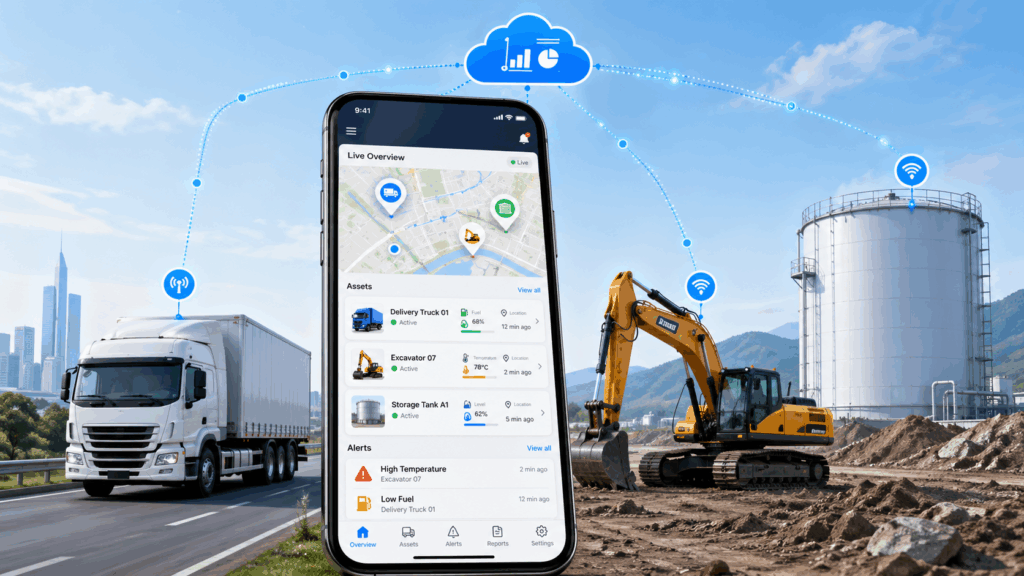
A refrigerated truck is somewhere on the highway. The cargo inside needs to stay below 4°C. The driver hasn’t called in. The dispatcher has no idea what’s happening inside that container.
Ten years ago, that was a normal situation. Today, a mobile app answers that question automatically — with a live temperature reading, a six-hour graph, and an alert that fired the moment the sensor value drifted out of range. Nobody had to call anyone.
That’s what IoT monitoring and telematics apps do for businesses, especially when vehicles, equipment, and remote assets need real-time visibility. They turn sensor data from physical assets into decisions — delivered to the right person, on a phone, before a problem becomes a loss. And while the backend infrastructure behind these apps is complex, building the mobile interface itself has become far more accessible — even for businesses without a dedicated engineering team, thanks to modern no-code app builders.
This guide covers how these apps work, what they’re used for, which industries rely on them, and what to think through before building one.
What Is an IoT Monitoring App?
An IoT monitoring app is a mobile application that connects to physical sensors, collects data from them in real time, and presents that data in a way that helps people make operational decisions.
The “IoT” part — Internet of Things — refers to the hardware side: sensors, trackers, and connected devices embedded in physical assets. The app is the human interface to that hardware network.
What separates an IoT monitoring app from a basic tracking tool is the type of data it handles. A tracking app tells you where something is. An IoT monitoring app tells you its condition — temperature, fuel level, tire pressure, engine load, vibration, door status, battery charge, or any other parameter a sensor can measure.
That difference is significant. A vehicle can be at exactly the right GPS coordinates while its refrigeration unit is failing and the cargo inside is warming up. An IoT monitoring app catches that. A location tracker doesn’t.
The practical result is a shift from reactive problem management — finding out something went wrong after the fact — to proactive visibility where deviations are caught and acted on while there’s still time to do something about them.
How IoT Apps Work: From Sensor Data to Business Decisions
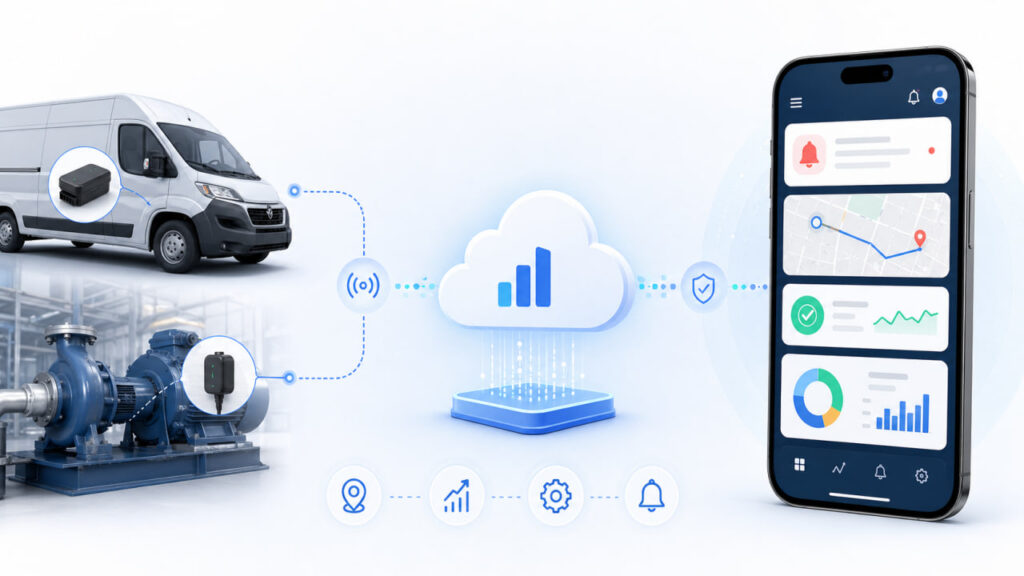
Getting a sensor reading from a physical asset onto a manager’s phone involves five steps. Each step has its own requirements, and a gap at any point breaks the whole system.
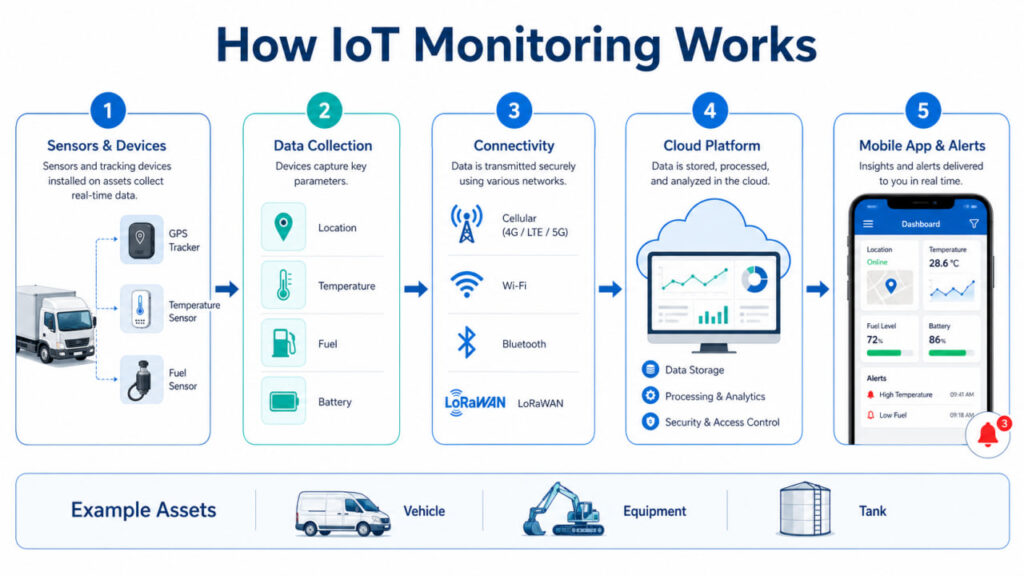
Step 1. A device or sensor is attached to the asset
Every IoT monitoring setup starts with hardware attached to the asset being monitored. What that hardware looks like depends entirely on what you’re trying to measure.
For a vehicle fleet, it might be a GPS tracker with a CAN bus interface that reads engine data directly from the vehicle’s electronics. For a refrigerated container, it’s a temperature probe installed inside the cargo space. For heavy equipment, it could be a combination of vibration sensors, fuel sensors, and an hour meter. For a stationary tank, pressure and level sensors.
Sensor selection is where the project either gets scoped correctly or goes wrong. The sensor needs to measure the right thing, withstand the physical environment the asset operates in, and connect to a terminal that can read its output format.
Step 2. The device collects real-time data
Once sensors are in place, they measure their target parameter at defined intervals — every few seconds for parameters that change quickly, every few minutes for slower-changing conditions like tank temperature or battery charge.
A local controller or telematics terminal aggregates sensor readings, applies any onboard processing (filtering noise, detecting events), and prepares data packets for transmission. This local layer matters for reliability: if cellular connectivity drops, the terminal stores readings onboard and uploads them when the connection resumes, so no data is lost during coverage gaps.
Step 3. Data is sent through a network
Most IoT hardware transmits over cellular networks — 4G LTE where available, with fallback to earlier standards in areas with limited coverage. Assets operating in genuinely remote locations use satellite communication.
For assets that stay within a facility or depot, Wi-Fi or LoRaWAN (a low-power, long-range wireless protocol suited to IoT) can handle transmission. Mixed deployments are common: cellular for assets in transit, Wi-Fi when they return to a fixed location.
The transmission layer needs to handle intermittent connectivity gracefully. In real fleet operations, trucks pass through tunnels, enter underground parking, and drive through rural dead zones. The system has to account for these gaps without losing data or triggering false alerts.
Step 4. The cloud platform processes the data
Raw sensor readings arrive at a backend platform that stores, processes, and acts on them. This is where business logic runs: alert thresholds are evaluated, historical data is aggregated into reports, and data from different devices across different manufacturers gets normalized into a consistent format.
Enterprise telematics platforms handle this at scale — millions of data points per day from thousands of assets, with customizable rule sets that route alerts to the right people based on asset type, location, severity, or time of day.
The platform is also where integrations live. When a monitoring event needs to trigger an action in a maintenance system, CRM, or ERP, the integration happens at this layer — not in the mobile app itself.
For teams managing complex equipment or distributed assets, an IoT remote monitoring platform can help connect devices, process sensor data, configure alerts, and coordinate monitoring workflows from one place.
Step 5. The mobile app shows actionable insights
The app is the final step in the chain, and in many ways the most important one for adoption. All the sensor hardware and backend processing only creates value if the right person sees the right information at the right time and knows what to do with it.
A well-designed IoT monitoring app doesn’t show everything — it shows what matters to the specific user opening it. A driver sees their vehicle’s status and any active alerts for their unit. A fleet manager sees an operational overview with anomalies highlighted. A customer sees confirmation that their shipment stayed within required parameters throughout transit. Building this kind of targeted mobile interface is the layer where Android app development tools have the most to offer — wrapping complex backend data in a clean, role-specific UI.
Same underlying data, different views, designed around what each user is actually trying to do.
Why Businesses Need IoT Apps for Remote Asset Monitoring
The business case for IoT monitoring almost always starts with a specific, expensive problem. Here are the most common ones.
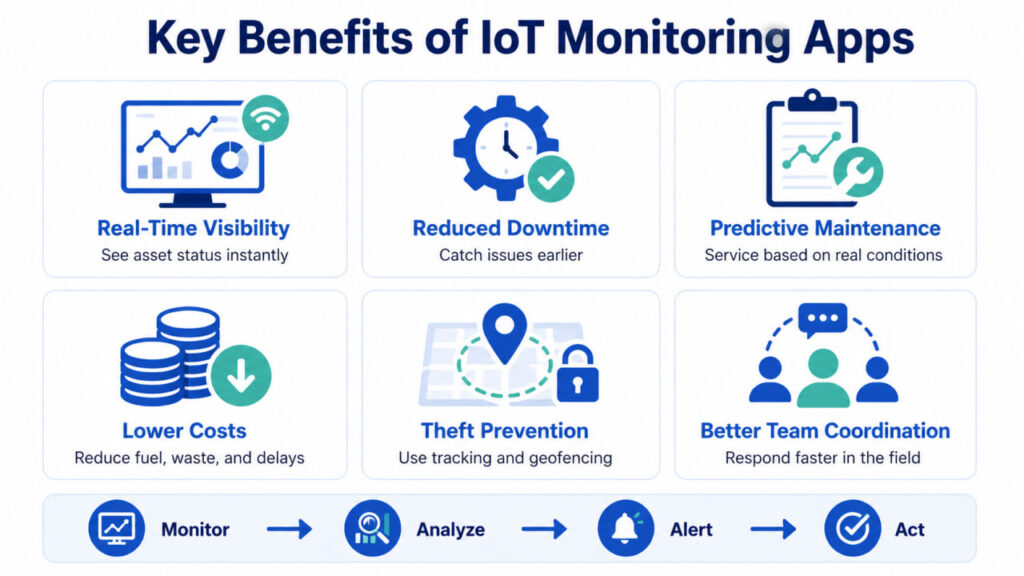
Real-time visibility
When assets are distributed across multiple sites, routes, or regions, no one has an accurate picture of what’s happening without a monitoring system. Decisions get made on yesterday’s data, last week’s report, or what someone said on the phone.
IoT monitoring replaces that uncertainty with a live operational view. Every asset’s location, status, and condition is visible from a single screen, updated continuously.
Reduced downtime
Unplanned equipment failure is expensive twice over — once for the repair, and again for the work that stops while the asset is out of service. IoT sensors detect early warning signs before failures happen: unusual vibration, rising operating temperature, abnormal fuel consumption, unexpected changes in engine parameters.
Catching a problem at the warning stage versus the breakdown stage typically means the difference between a scheduled maintenance window and an emergency repair with operations stopped.
Better asset utilization
Most businesses don’t have an accurate picture of how their assets are actually being used. Equipment sits idle on one site while a crew waits for it on another. Vehicles make unnecessary trips. Machinery runs below optimal parameters because operators override settings.
IoT utilization data shows exactly where each asset is, how much it’s working, and where it’s sitting unused. That visibility usually uncovers productive capacity that was already paid for but wasn’t being captured.
Theft prevention and geofencing
Mobile equipment, tools, vehicles, and portable assets are theft targets. IoT monitoring provides real-time location tracking and geofencing — if an asset leaves a defined zone without authorization, an alert fires immediately rather than being discovered the next morning.
The deterrent effect is substantial on its own. When drivers and operators know that location and behavior data is being recorded, unauthorized use drops significantly.
Lower maintenance costs
Time-based maintenance schedules service equipment on a fixed calendar regardless of actual condition — which means some maintenance happens too early, and some assets develop problems between scheduled intervals. IoT monitoring enables condition-based maintenance: service when the data shows it’s needed.
For heavy equipment fleets, shifting from time-based to condition-based maintenance typically reduces maintenance spend by 10–25% while improving reliability, because the schedule reflects actual equipment state rather than averages.
Better field team coordination
When dispatchers can see every vehicle’s real-time location and status, routing decisions are faster and more accurate. Unexpected situations — a vehicle breakdown, an early delivery, a route deviation — can be responded to immediately rather than discovered when someone fails to check in.
Driver behavior data gives managers objective inputs for coaching conversations: speeding events, harsh braking frequency, idle time. That data tends to improve behavior when it’s shared constructively rather than used punitively.
What Types of Assets Can Be Monitored with IoT Apps?
Any asset with a sensor attached to it can be monitored. In practice, IoT monitoring delivers the most value for assets that are high-value, difficult to observe directly, or prone to conditions that cause damage or loss if they go undetected.
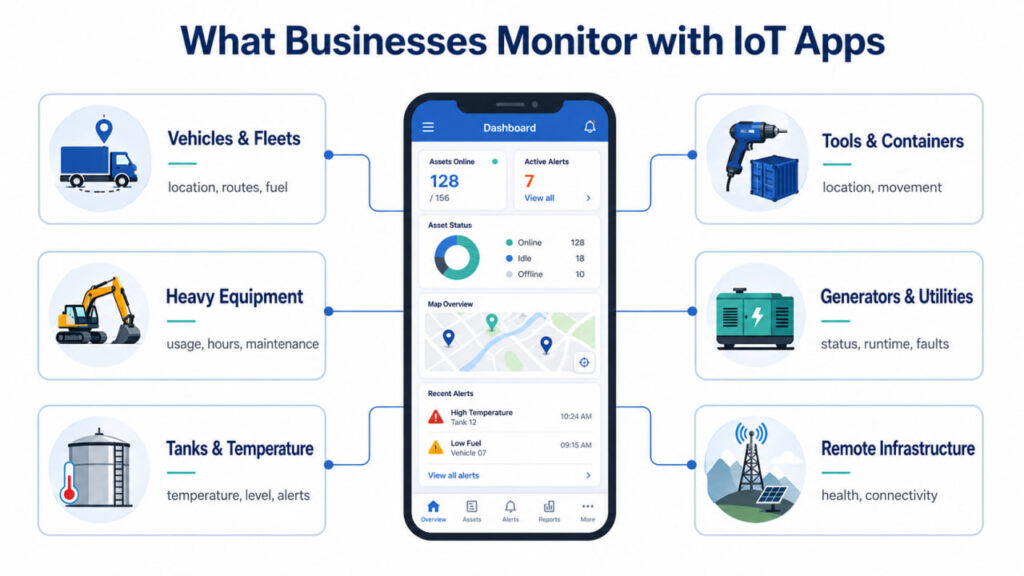
Vehicles and fleets
The most widely deployed IoT monitoring use case. Commercial trucks, delivery vans, construction vehicles, transit buses, and emergency response vehicles all benefit from GPS location combined with operational data: engine parameters from the CAN bus, fuel consumption, driver behavior events, and video telematics.
Fleet monitoring apps are often the first IoT investment a business makes, because the ROI is visible quickly and the hardware ecosystem is mature.
Heavy equipment and machinery
Excavators, cranes, bulldozers, generators, compressors, industrial pumps — any high-value powered equipment where a breakdown is expensive and preventable problems are detectable in advance.
Typical monitoring parameters include engine hours, hydraulic pressure, fuel consumption, operating temperature, and attachment position. The high cost of equipment acquisition and downtime makes the business case for condition monitoring straightforward to justify.
Tanks and temperature-sensitive assets
Refrigerated containers, liquid storage tanks, pharmaceutical cold storage, chemical tanks, and food processing equipment all require environmental monitoring — primarily temperature, but also pressure, fill level, and humidity depending on contents.
A concrete example: TAI Capital developed a mobile app for thermal tank temperature monitoring for a fleet of 25+ refrigerated containers transporting food products. The app displays live temperature, generates historical graphs for any time period, and triggers alerts when values move outside acceptable limits. After one year in operation, 95% of drivers were responding promptly to temperature deviations — a result that was impossible to achieve with manual logging.
The technical approach retrofitted digital sensors alongside existing analog hardware without replacing it, connecting everything to navigation terminals already installed on the vehicles.
Tools, containers, and portable assets
High-value portable equipment — surveying instruments, medical devices, industrial tooling, shipping containers — can be monitored with small GPS or Bluetooth tracking tags. The monitoring is typically simpler than fleet or equipment monitoring (location and custody tracking rather than operational data), but the loss prevention and asset recovery value is significant.
Remote infrastructure
Pipelines, electrical substations, water treatment equipment, telecom towers, weather stations — infrastructure assets in remote locations that would otherwise require physical inspection can be monitored continuously over cellular or satellite networks. The monitoring app brings these assets into the same operational picture as mobile equipment.
Key Features Every IoT Monitoring App Should Have
Not every app needs every feature on this list. But these capabilities separate a monitoring tool that people actually rely on from one that gets used for a week and then ignored.
Real-time dashboard
The main screen should answer “is everything okay right now?” in under five seconds. That means a status overview showing active alerts, a map with all asset locations, and quick indicators for the parameters that matter most — without requiring the user to navigate into individual asset profiles to see the current state of the fleet.
GPS map and route history
Current location is the baseline. Route history adds the ability to review where an asset has been, verify that planned routes were followed, investigate incidents by replaying movement, and confirm delivery or service completion at specific locations.
Push notifications and alerts
Alerts are where IoT monitoring delivers most of its operational value. When a sensor reading crosses a threshold — temperature too high, asset leaves a geofence, vehicle speeding, fuel drain detected — the right person gets a notification immediately, on their phone, wherever they are.
Alert configuration needs to be flexible enough to avoid notification fatigue: different thresholds for different asset types, different routing for different alert severities, and the ability to adjust sensitivity based on operational experience. Getting push notification strategy right is one of the most important design decisions in any monitoring app — too many alerts and users start ignoring them, defeating the purpose entirely.
Asset profiles
Each monitored asset should have a dedicated view with current status, live sensor readings, recent alert history, maintenance records, and relevant documentation. This becomes the single source of truth for each asset — the first place anyone looks when they need to know something about a specific vehicle or piece of equipment.
Reports and analytics
Raw sensor data becomes more useful when it’s aggregated over time. Fuel consumption trends, mileage summaries, utilization rates, temperature compliance logs, driver behavior scores — these reports are what turn day-to-day monitoring data into inputs for strategic decisions. Knowing how to understand your app analytics — and which metrics actually indicate healthy operations versus noise — is what separates teams that use their monitoring system from teams that just have one.
Role-based access
Drivers need their own vehicle data. Site supervisors need their site’s equipment. Fleet managers need the full picture. Customers may need a limited compliance view. Role-based access ensures each user sees what’s relevant to their role and nothing that isn’t.
Offline mode or low-connectivity support
Field users operate in areas with poor signal — underground, inside metal buildings, in rural zones. An app that stops functioning when cellular drops is unreliable for the people who use it most. Offline mode caches recent data locally and queues any user actions for sync when connectivity resumes.
Integrations
IoT data creates the most value when it flows into the other systems a business already uses — maintenance management platforms, dispatch software, ERP, CRM, or custom internal tools. API-based integrations prevent monitoring data from becoming another siloed system that requires manual re-entry elsewhere.
IoT Apps for Vehicles: From GPS Tracking to Fleet Insights
Fleet monitoring was one of the first commercial IoT use cases and remains the most widely deployed. The technology has evolved well past basic GPS tracking.
Modern fleet IoT apps pull from multiple onboard data sources simultaneously: GPS for location, CAN bus for engine and transmission parameters, fuel sensors for consumption and drain detection, accelerometers for driver behavior events, and cameras for incident recording and driver monitoring. For businesses exploring how to design GPS tracking software without a large development budget, no-code platforms have made the mobile interface layer significantly more accessible.
The combination creates a complete operational picture of each vehicle — not just where it is, but how it’s being driven, whether fuel consumption is within expected ranges, whether maintenance is due based on engine hours or fault codes, and whether any safety events have occurred.
For fleet managers, the most actionable analysis usually comes from comparison across the fleet. A vehicle consuming 15% more fuel than similar trucks on similar routes is a signal worth investigating — it could point to a mechanical issue, driving behavior, or unauthorized use.
Driver behavior data is a significant component of modern fleet apps. Harsh braking, rapid acceleration, speeding, and excessive idle time are detectable from standard onboard sensors. When shared with drivers as a performance metric rather than a surveillance record, this data reliably improves driving behavior — most people respond to objective feedback when it’s framed around performance rather than punishment.
IoT Apps for Equipment Monitoring and Predictive Maintenance
Heavy equipment is expensive to acquire, expensive to operate, and expensive to repair. A single avoided unplanned breakdown on a machine worth several hundred thousand dollars typically pays for years of monitoring costs — which is why the business case for equipment IoT monitoring is often easier to make than fleet monitoring.
The failure modes for equipment differ from vehicles, and the monitoring strategy follows those differences. Rising engine temperature or falling oil pressure are leading indicators of engine problems. Hydraulic pressure anomalies signal potential system failures before they progress. Abnormal vibration in rotating components — motors, pumps, compressors — often precedes bearing failures by days or weeks, giving maintenance teams time to plan and schedule the work.
Effective predictive maintenance requires establishing normal operating baselines for each piece of equipment before anomaly detection is meaningful. That baseline period typically takes several weeks of clean data collection. Equipment monitoring apps need to surface this data in a way that distinguishes genuine anomalies from normal variation — a temperature reading that’s high during full-load operation in summer heat is not the same signal as the same reading during light-load operation in moderate weather.
IoT Apps for Remote and Hard-to-Reach Assets
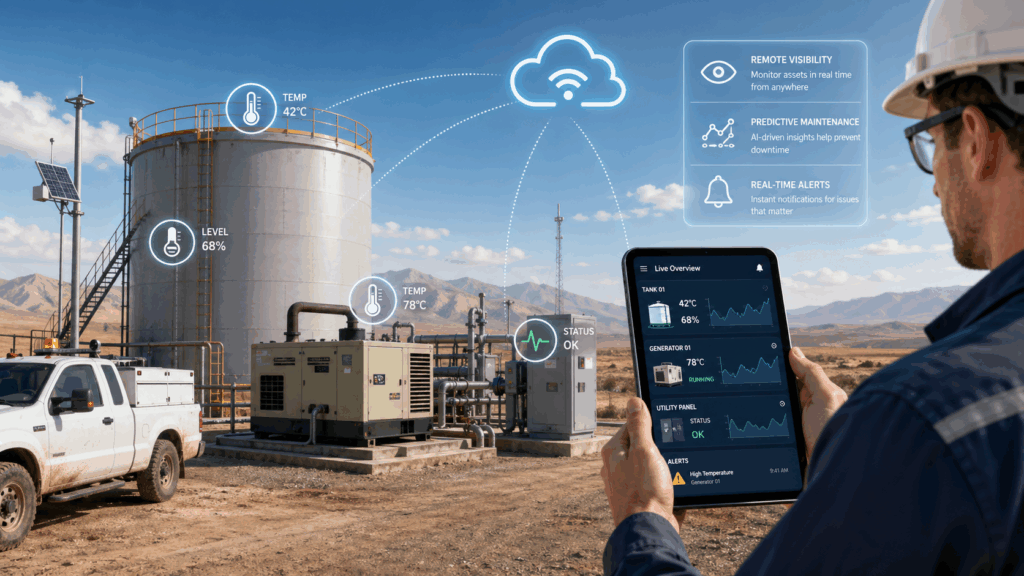
Some assets can’t be checked on easily — remote pipeline monitoring points, electrical substations in rural areas, offshore platforms, underground mining equipment, water treatment facilities far from any office.
For these assets, IoT monitoring isn’t a convenience feature — it’s the only practical alternative to physical inspections that might happen weekly or monthly at best. Satellite connectivity covers locations where cellular networks don’t reach, enabling real-time monitoring from essentially anywhere.
Remote asset monitoring apps are typically designed differently from fleet apps. Update intervals are longer (minutes rather than seconds) because battery life and data transmission costs matter more in low-power remote deployments. Solar-powered monitoring hardware with satellite connectivity can run for years without on-site maintenance.
The alert-first design philosophy is especially important for remote assets: a manager sitting far from the asset has no operational context visible to them, so the app must surface only what requires attention rather than a continuous feed of routine readings. Signal-to-noise ratio is everything.
Common Industries That Use IoT Monitoring Apps
Logistics and transportation
Temperature-controlled freight, fuel consumption monitoring, route compliance, and delivery time verification. Regulatory requirements in many markets mandate continuous electronic logging for certain cargo types and vehicle categories, making IoT monitoring both an operational tool and a compliance requirement.
Construction
Equipment utilization tracking across job sites, theft prevention for portable tools and machinery, fuel monitoring on generators and heavy equipment, and safety monitoring — equipment operating outside designated zones triggers immediate alerts.
Agriculture
Soil condition monitoring, irrigation system status, weather stations across large land areas, and harvest machinery tracking. Uptime during seasonal harvest windows is critical, making predictive maintenance monitoring especially valuable.
Energy and utilities
Pipeline integrity monitoring, substation equipment condition, transformer temperature, generator status. Infrastructure failures in this sector carry high consequences — both financial and safety-related — making continuous monitoring a standard operating practice.
Manufacturing
Production line equipment condition monitoring, predictive maintenance on critical machinery, environmental monitoring in controlled-atmosphere facilities, and inventory tracking for high-value components and tooling.
Healthcare
Medical equipment location tracking within hospital facilities, cold-chain monitoring for pharmaceutical storage and transport, and equipment utilization tracking to optimize deployment of expensive capital assets across departments.
How Mobile Apps Make IoT Data Easier to Use
The gap between data collected and data actually used is the central operational challenge of IoT monitoring. Sensors can generate enormous volumes of readings — a fleet of 100 vehicles with 20 sensor parameters each, reporting every 30 seconds, produces millions of data points daily. Most of that data only matters when something deviates from normal.
Mobile apps solve the distribution problem. Web dashboards are powerful for analysis but require someone to actively look at them. A push notification reaches the right person wherever they are, without requiring them to monitor a screen. The difference between a missed alert at 2am and a caught problem is often just whether the notification channel reaches the person on call.
The design of the app determines whether alerts get acted on or ignored. Too many notifications, and people stop reading them — understanding the importance of push notifications and how to use them without causing alert fatigue is a core design challenge in any IoT monitoring app. Critical information buried inside menus means slow response. Confusing interfaces cause errors under time pressure.
That context matters more than most developers expect. A field technician using a monitoring app on a construction site is doing so one-handed, possibly in direct sunlight, possibly while walking. A driver checking an alert is doing so in a cab, possibly at night, with limited time to look at a screen. These aren’t edge cases — they’re the normal conditions for the people the app is built for.
Challenges of IoT Monitoring Apps
IoT monitoring projects that underdeliver usually run into one or more predictable problems.
Connectivity gaps
Assets in tunnels, underground, inside metal structures, or in remote areas will experience connectivity interruptions. The system needs to handle this gracefully — buffering data on the device, resuming transmission when coverage resumes, and not triggering false alerts based on transmission gaps rather than actual sensor events.
Data overload
Volume without filtering creates noise rather than insight. Without intelligent aggregation and alert calibration, high-frequency sensor data overwhelms users rather than helping them. The design challenge is surfacing the small percentage of data that actually requires attention while making the rest available for analysis when needed.
Battery life
Sensors and terminals on non-powered assets — trailers, containers, portable equipment — depend on batteries. Battery life determines service intervals and constrains transmission frequency. Low-power hardware design and efficient transmission protocols are engineering requirements, not afterthoughts.
Hardware compatibility
Mixed fleets typically include equipment from different manufacturers with different sensor output formats and communication protocols. Normalizing this diversity into a consistent monitoring view requires middleware that can translate between formats — a significant integration challenge when the hardware ecosystem is fragmented across brands and generations.
Security and access control
IoT monitoring systems collect sensitive operational data: vehicle locations, asset inventories, fuel consumption patterns, production data. Unauthorized access is a business risk. Requirements include encrypted transmission, strong authentication, role-based access, and security auditing of connected hardware — the hardware attack surface is often underestimated. On the software side, this extends to the mobile app itself: server monitoring and backend performance tracking are as important as the field-facing features.
Integration with existing systems
Most businesses already have software: fleet management tools, maintenance systems, ERP platforms, HR systems with driver records. A monitoring app that doesn’t connect to existing systems creates duplicate data entry and siloed information. Integration scope is consistently underestimated in initial project planning and consistently overruns in execution.
How to Plan an IoT Monitoring App for Your Business
A monitoring app project that begins with “we want an app” before defining the operational problem tends to produce something technically functional but practically irrelevant. These questions focus the planning before any development begins.
What specific problem are you solving? Start with the business outcome — reducing fuel losses, proving temperature compliance, preventing equipment breakdowns — not the technology. Each answer leads to different sensor requirements, different alert logic, and different user workflows.
Who are the users, and where do they use the app? Drivers, dispatchers, managers, maintenance staff, and customers have different information needs and different physical contexts. Design for each user type before making interface decisions.
What hardware do you already have? Existing GPS terminals and sensors often provide more data than is currently being used. An audit of installed hardware typically reveals monitoring opportunities that don’t require new hardware investment.
What does “actionable” look like for each alert type? An alert that nobody knows how to respond to is noise. Map out the response workflow for each alert before finalizing threshold configurations.
Build or integrate? Many telematics platforms offer configurable apps and open APIs. Custom development is justified when requirements don’t fit existing platforms — unusual sensor types, specific compliance workflows, tight integration with internal systems. For many use cases, configuring an existing platform is faster, cheaper, and lower risk than building from scratch. For businesses starting with simpler monitoring needs, no-code app development tools can get a working interface in front of users quickly, with custom development added later as requirements become clearer.
Future of IoT Apps in Asset Monitoring
Several converging technology trends are expanding what IoT monitoring apps can do.
AI-based anomaly detection is moving monitoring beyond fixed-threshold alerts. Instead of triggering when a reading crosses a preset value, machine learning models learn each asset’s normal behavior patterns and flag deviations from that baseline — catching subtle degradation trends that fixed thresholds miss entirely.
Voice AI integration is beginning to appear in fleet operations, with voice assistants connected to telematics platforms that can answer status questions verbally, accept driver reports, and route information to dispatch or CRM systems without manual data entry. This is especially relevant for reducing dispatcher workload in high-volume operations.
Edge computing pushes processing closer to the sensor, reducing latency and enabling monitoring in environments where round-trip cloud communication is too slow or unreliable. Onboard processing can detect and respond to events locally, with cloud sync for historical data and reporting.
5G connectivity increases bandwidth and reduces latency for connected assets in coverage areas, enabling higher-frequency sensor reporting and live video streaming from field equipment.
Digital twins — real-time virtual models of physical assets updated continuously from sensor data — allow simulation of how changes in operating conditions or maintenance decisions affect asset performance, before any physical changes are made.
Conclusion
IoT monitoring apps close the gap between what’s happening with physical assets and what the people responsible for them actually know.
The mechanism is consistent: sensors measure conditions, data flows through a network to a processing platform, and a mobile app surfaces what requires attention to the right person at the right time. What varies is the complexity of the hardware integration, the specificity of the use case, and how well the app experience fits the actual workflow of the people using it.
For businesses with fleets, field equipment, or remote assets where limited visibility creates real operational and financial risk, the economic case for monitoring is usually not difficult to make. The harder and more important work is in the planning: defining the problem precisely, auditing what hardware already exists, designing for real users in real field conditions, and making an honest build-versus-integrate decision based on actual requirements.
The technology is accessible and the implementation patterns are well-established. What determines whether a monitoring app actually changes operations is how well it fits the people and processes it was built for. Whether you start with a no-code Android app as a proof of concept or go straight to custom development, the planning work — defining the problem, mapping the users, auditing the hardware — is the same either way.
FAQ
What is an IoT monitoring app?
An IoT monitoring app is a mobile application that collects data from physical sensors attached to assets — vehicles, equipment, tanks, or infrastructure — and displays it in a format that helps people make operational decisions. It turns raw sensor readings into alerts, dashboards, and reports.
How is IoT monitoring different from GPS tracking?
GPS tracking shows you where an asset is. IoT monitoring shows you its condition — temperature, fuel level, engine status, tire pressure, or any parameter measured by sensors. Location is one data point in an IoT monitoring system, not the whole picture.
What types of businesses use IoT monitoring apps?
Logistics, construction, agriculture, manufacturing, energy, and healthcare are the most common sectors. Any industry with physical assets that are high-value, hard to observe directly, or prone to conditions that cause damage if undetected benefits from monitoring.
How long does it take to build an IoT monitoring app?
Configuration on an existing telematics platform can be done in weeks. Custom development for specific sensor integrations, compliance requirements, or complex system integrations typically takes several months. Hardware installation is often the longer timeline constraint.
Can IoT monitoring apps work without internet connectivity?
With proper design, yes. Apps should cache data locally during connectivity gaps and sync when connection resumes. Hardware terminals buffer readings onboard so data isn’t lost during transmission interruptions.
What sensors are most commonly used?
Temperature probes, GPS modules, fuel level sensors, CAN bus interfaces for vehicle data, pressure sensors, vibration sensors, door/hatch sensors, and current sensors — depending on what the asset and use case require.
How is IoT monitoring data secured?
Enterprise platforms use encrypted transmission, strong authentication, and role-based access controls. Hardware security — physical tamper protection, secure firmware update processes — is equally important and often overlooked in early planning stages. The app layer itself needs regular performance monitoring and optimization to ensure reliability under real operating conditions.
About the Author
TAI Capital is an international IoT and telematics engineering company with 12+ years of experience and 500+ fleet implementation projects across logistics, construction, mining, public transport, and fuel transportation industries.
The company develops and deploys fleet management systems, GPS vehicle tracking, fuel monitoring, video telematics, and custom IoT software — including mobile applications for industrial monitoring built on platforms such as Wialon, Titan, and proprietary integrations. TAI Capital’s engineering team has monitored 50,000+ vehicles and assets worldwide, building solutions for both standard fleet operations and specialized use cases such as tank temperature monitoring, CAN bus data extraction, sailing yacht tracking, and AI-powered voice dispatch assistants.