
10 Best No-Code AI App Builders in 2026: Tools Compared
Quick Answer: The best no-code AI app builder depends on what you want to ship. AppsGeyser is a practical choice for Android-first projects and turning an existing website or published AI-generated web app into an Android app. Bubble combines AI generation with web and native mobile development. FlutterFlow is strong for cross-platform apps and Flutter code export. Adalo works well for database-driven apps built from a prompt, while Glide and Softr focus more heavily on business software and internal tools.
There is no single AI app builder that is best for every project. A tool that works well for an internal inventory system may be the wrong choice for an Android app intended for Google Play. Likewise, a prompt-to-code platform may offer more flexibility than a traditional no-code builder, but it can require more technical involvement after generation.
This guide compares 10 AI and no-code app-building platforms by what they help you build, where the resulting app can run, how much technical control they provide, and the limitations to understand before choosing one.
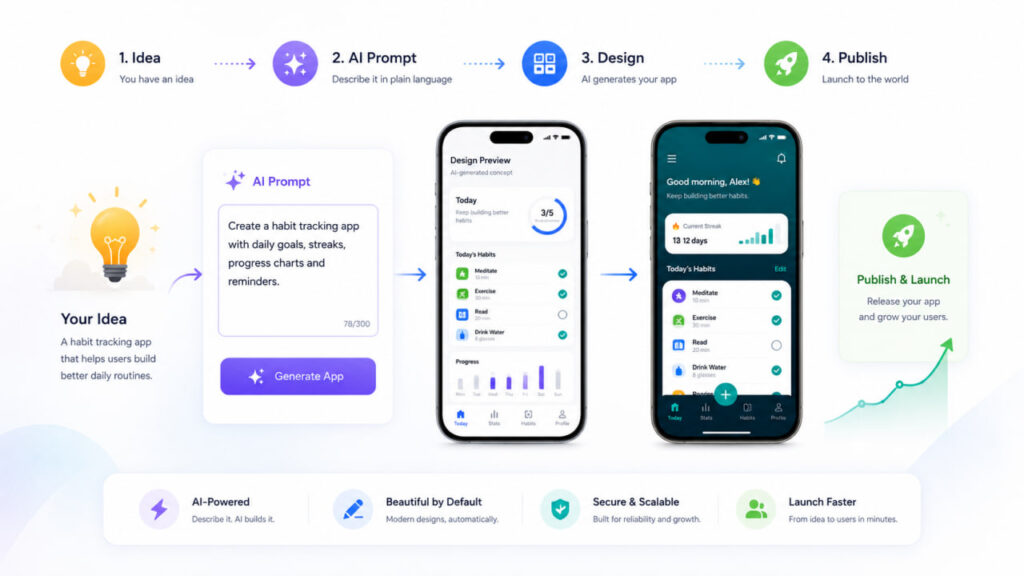
Best No-Code AI App Builders at a Glance
| Builder | Best for | AI creation | Main output | Code export | Learning curve |
|---|---|---|---|---|---|
| AppsGeyser | Android-first and website-to-app projects | AI-assisted workflow | Android | Not the main workflow | Low |
| Bubble | Complex web and native mobile products | Prompt-to-app and AI assistance | Web, iOS, Android | No traditional full source-code export | Medium–High |
| FlutterFlow | Advanced cross-platform apps | AI design and code assistance | iOS, Android, Web | Flutter code | Medium–High |
| Adalo | Database-driven apps and MVPs | Prompt-to-app with Ada | iOS, Android, Web | Not the main workflow | Medium |
| Thunkable | AI-built native mobile apps | Prompt-to-functional app | iOS, Android, Web | Not the main workflow | Medium |
| Glide | Internal tools and operational apps | Prompt or spreadsheet-to-app | Web/PWA-oriented | No traditional full export | Low–Medium |
| Softr | Portals and business software | AI Co-Builder | Web business apps | No traditional full export | Low |
| Lovable | AI-generated full-stack web apps | Prompt-to-app | Web | Editable code and GitHub workflow | Medium |
| Bolt | AI-generated web and mobile projects | Prompt-to-code | Web and mobile via Expo | Code-based workflow | Medium |
| Appy Pie | Beginner-friendly prompt-to-app creation | Prompt-to-app | iOS, Android | Not the main workflow | Low |
How We Evaluated These AI App Builders
We focused on what happens after the initial AI prompt: what the platform can build, web and mobile output, AI capabilities, editing workflow, app-store support, backend and database options, source-code access, learning curve, production suitability, and important limitations. The ranking is based on use case rather than the assumption that one builder is objectively best for everyone.
What Is a No-Code AI App Builder?
A no-code AI app builder combines visual or managed app development with artificial intelligence. Depending on the platform, AI may generate screens, database structures, workflows, content, code, or an initial working application from a plain-English prompt.
The category has become less clear-cut in 2026. Traditional no-code platforms are adding AI generation, while AI coding tools are adding hosting, databases, deployment, and mobile workflows. The practical question is no longer simply whether a tool uses AI. It is what the AI creates and what you will need to manage after generation.
1. AppsGeyser — Best for Android-First and Website-to-App Projects
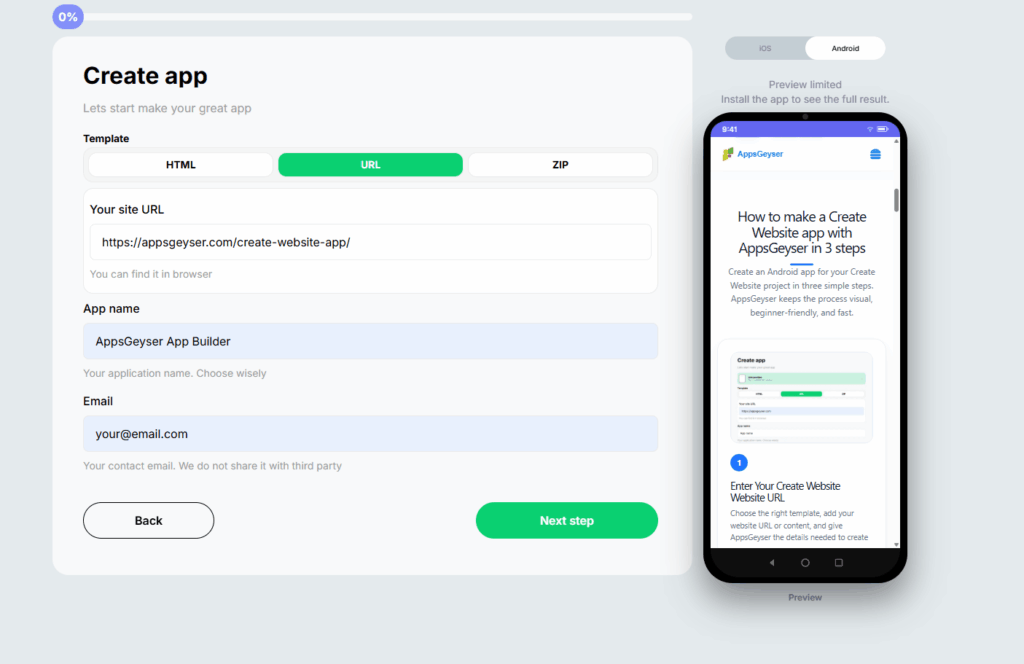
AppsGeyser is most useful when your destination is an Android app and you already have, or can first create, a mobile-friendly web experience. That can include an existing website, online service, HTML project, or a public web app created with an AI development tool.
Instead of rebuilding the project screen by screen, you can publish or prepare the web experience and use AppsGeyser to convert the website into an Android app. If you are starting with AI, see the AI App Builder guide and the AI website-to-mobile workflow.
Best for
Android-first projects, website-to-app conversion, existing web content, and turning a published AI-generated web project into an Android app.
Strengths
The workflow is accessible to non-developers and avoids rebuilding an existing web experience from scratch. It also fits naturally after AI website and web-app tools when the generated project already works well on mobile.
Limitations
AppsGeyser is not a replacement for a full-stack development platform when a project requires complex custom backend logic, deeply customized native behavior, or developer-level control over an entire codebase.
2. Bubble — Best for Complex Web and Native Mobile Products
Bubble combines visual development, database logic, workflows, AI-assisted generation, hosting, and native mobile development. Its native mobile builder targets iOS and Android, making Bubble relevant to projects that may need both web and mobile experiences.
Best for
SaaS products, marketplaces, workflow-heavy applications, and projects that may need both web and native mobile experiences.
Strengths and limitations
Bubble offers substantial application logic without requiring a conventional coded stack, but its breadth creates a larger learning curve than simpler builders. Teams still need to understand data models, permissions, workflows, and product architecture.
3. FlutterFlow — Best for Cross-Platform Apps With Code Ownership
FlutterFlow is a visual development platform for cross-platform applications. It supports iOS, Android, and web deployment and can provide access to the generated Flutter code on supported plans. Its AI tooling can assist with screen design and development tasks.
Best for
Advanced mobile apps, startups with technical resources, API-connected applications, Firebase or Supabase projects, and teams that value source-code access.
Strengths and limitations
Cross-platform output, integrations, visual control, and Flutter code export offer flexibility. The trade-off is a higher learning curve: builders still need to make decisions about state, data, APIs, architecture, and deployment.
4. Adalo — Best for AI-Generated Database-Driven MVPs
Adalo combines prompt-based generation through Ada with a visual builder for database-driven applications. A project can target iOS, Android, and web, making it useful for founders who want to start with AI and continue editing visually.
Best for
Database-driven MVPs, directories, booking systems, community products, and other multi-screen applications with users and structured data.
Strengths and limitations
AI can reduce setup work, while the visual canvas keeps editing accessible. It does not eliminate product design: data, user flows, permissions, and behavior still need thoughtful configuration and testing.
5. Thunkable — Best for Prompt-to-Native Mobile Apps
Thunkable combines AI-assisted app generation with a visual mobile-app workflow and publishing options for iOS and Android. It is useful when you want AI to create a starting point but still expect to refine app behavior and mobile interactions.
Best for
Creators building interactive mobile apps who want prompt-based assistance and native mobile publishing without starting from traditional source code.
Strengths and limitations
AI generation and mobile-first publishing make Thunkable a useful middle ground between basic builders and developer-oriented platforms. More sophisticated behavior still requires understanding and testing the generated app.
6. Glide — Best for AI-Powered Internal Business Tools
Glide focuses on operational business software. Its AI-driven workflows can turn prompts or structured business data into apps for inventory, CRM, field operations, approvals, dashboards, and similar use cases.
Best for
Internal tools, operational dashboards, CRMs, inventory systems, field tools, and apps built around existing business data.
Strengths and limitations
Glide is fast and data-centric, but its apps are web/PWA-oriented and Glide does not support direct publishing to Google Play or Apple’s App Store. Choose another route when direct native app-store distribution is a core requirement.
7. Softr — Best for Portals and Business Software
Softr focuses on client portals, internal tools, CRMs, intranets, inventory tools, and other business applications. Its AI Co-Builder can help generate an initial app structure from a description, while the visual environment supports continued no-code editing.
Best for
Client and partner portals, internal dashboards, CRMs, membership areas, and permission-driven business software.
Strengths and limitations
Softr pairs AI generation with business-oriented data, roles, and permissions. It is a better comparison for business web software than for teams whose primary requirement is a native consumer app in Google Play or the App Store.
8. Lovable — Best for AI-Generated Full-Stack Web Apps
Lovable uses natural-language prompts to generate full-stack web applications and gives users a code-oriented path through editable projects and GitHub integration. It is best understood as an AI web-app development platform rather than a native Android or iOS app builder.
Best for
Founders, makers, and teams that want to move quickly from an idea to a deployed web application while retaining access to the project code.
Strengths and limitations
Lovable is fast for web-app creation and supports a developer-friendly handoff. Native mobile distribution is not its primary output. If a Lovable project is published as a mobile-friendly website, see how to turn a Lovable web app into a mobile app.
9. Bolt — Best for AI-Generated Web and Mobile Projects With a Code-Based Workflow
Bolt generates applications from natural-language prompts and works closer to an AI coding environment than a traditional managed no-code builder. For mobile projects, its workflow can use Expo to target iPhone and Android from a shared codebase.
Best for
Makers and technical founders who want AI to generate the application while retaining a code-oriented development workflow.
Strengths and limitations
Prompt-driven iteration and web/mobile development are flexible, but project complexity increases the value of understanding the generated code and dependencies. For an Android-specific AppsGeyser workflow, see Bolt.new to APK.
10. Appy Pie — Best for Beginner-Friendly Prompt-to-App Creation
Appy Pie offers prompt-based app creation aimed at non-technical users who want a guided route from an app idea to a mobile application. Its positioning centers on making Android and iOS app creation accessible without traditional programming.
Best for
Beginners and small businesses that value a managed prompt-to-app workflow over developer-level control.
Strengths and limitations
The guided workflow lowers the initial barrier. Teams that need deeper architectural control or source-code ownership should compare it carefully with more developer-oriented alternatives.
Other Builder Worth Considering: GoodBarber
GoodBarber is an established no-code platform for branded content, commerce, and community apps. It supports native iOS and Android applications as well as a PWA. It is worth considering when design, content management, commerce, and a managed publishing ecosystem matter more than a prompt-first AI development experience.
Which AI App Builder Should You Choose?
| If your priority is… | Start by comparing… |
|---|---|
| Existing website → Android app | AppsGeyser |
| Complex web + native product | Bubble |
| Cross-platform + code export | FlutterFlow |
| Database-driven mobile MVP | Adalo |
| Prompt → native mobile app | Thunkable |
| Internal operations | Glide |
| Portal or business software | Softr |
| AI-generated full-stack web app | Lovable |
| AI + code-oriented web/mobile development | Bolt |
| Beginner prompt-to-app workflow | Appy Pie |
The important distinction is not which platform has the longest feature list. Choose based on the output you actually need. If Google Play distribution is essential, a web/PWA-focused builder may be the wrong starting point. If code ownership matters, compare export options before committing. If you already have a working mobile-friendly website, rebuilding it in a full visual development platform may add unnecessary work.
AI App Builder vs No-Code Builder vs AI Coding Tool
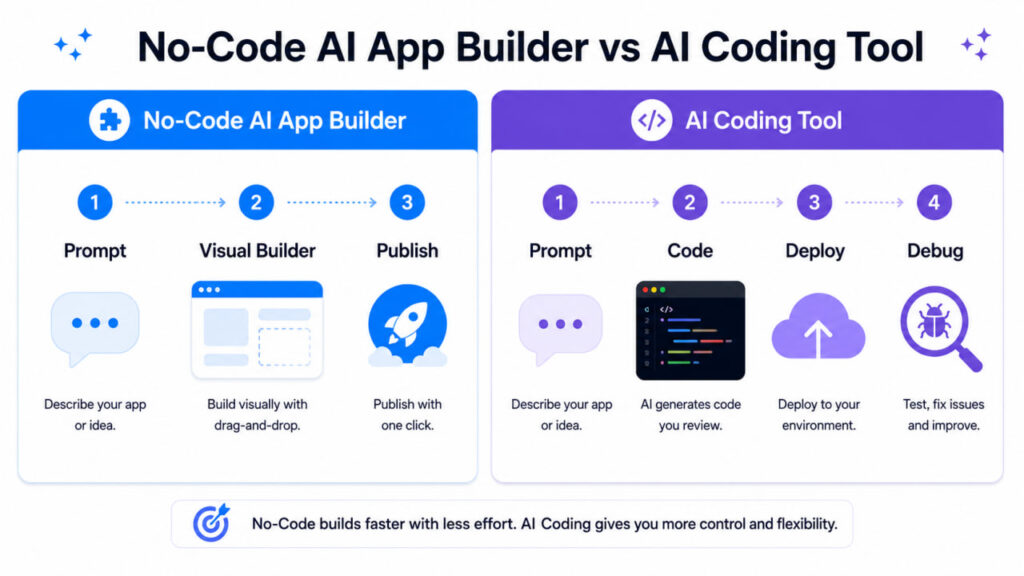
An AI app builder uses natural-language input to generate some or most of an application. A no-code app builder provides a managed visual environment for creating applications without traditional programming. An AI coding tool generates or modifies source code and may still require technical knowledge for debugging, architecture, security, deployment, and maintenance.
The categories increasingly overlap. Bubble, Adalo, Thunkable, Glide, and Softr combine AI generation with managed visual environments. FlutterFlow combines visual building, AI assistance, and source-code access. Lovable and Bolt sit closer to AI-generated software development. AppsGeyser is particularly relevant when an existing or AI-generated web experience needs to become an Android app.
When Not to Use a No-Code AI App Builder
No-code and AI-assisted platforms can reduce the work required to launch an application, but they are not automatically the right choice for every project. Custom development may be more appropriate when the product requires highly specialized native functionality, unusual performance characteristics, complex infrastructure, deep control over security architecture, unsupported integrations, or complete ownership of a custom technical stack.
The same applies when a platform’s deployment model conflicts with your requirements. A PWA-focused tool can be excellent for an internal business system but a poor choice when direct native app-store distribution is mandatory.
FAQ
What is the best no-code AI app builder?
There is no single best platform for every project. AppsGeyser is practical for Android-first and website-to-app projects; Bubble for complex web and native applications; FlutterFlow for cross-platform development with code export; Adalo for database-driven MVPs; and Glide or Softr for business software.
Can AI build an app without coding?
Yes. Several platforms can generate substantial parts of an application from a natural-language prompt. However, you may still need to configure data, permissions, integrations, store listings, testing, or deployment.
Which AI app builders can create Android and iOS apps?
Bubble, FlutterFlow, Adalo, Thunkable, GoodBarber, and Appy Pie offer workflows targeting both Android and iOS, although their technologies and publishing processes differ.
Can I turn an AI-generated web app into an Android app?
Yes. If the generated project is published at a public URL and works properly on mobile screens, a website-to-app workflow can turn that web experience into an Android application. This is one of the use cases where AppsGeyser fits naturally.
Do AI app builders let me export the source code?
It depends on the platform. FlutterFlow provides Flutter code export on supported plans, while other managed platforms may not provide a conventional full-code export workflow. Check this before choosing a platform if source-code ownership is important.
Can an AI-built app be published on Google Play?
Yes, provided the chosen platform produces an appropriate Android application and the finished app meets Google Play’s current technical and policy requirements. Building the app and being accepted by Google Play are separate steps.
Final Verdict
The AI app builder market in 2026 is no longer divided neatly between no-code and coding. Some visual platforms can generate substantial applications from prompts, while AI coding products are adding deployment and mobile workflows.
Choose the platform based on the product you need to maintain after the first prompt. For an existing website or published AI-generated web experience that needs an Android version, AppsGeyser offers a direct route without rebuilding the project from scratch. For complex web and native products, Bubble deserves consideration. FlutterFlow is a stronger fit when cross-platform development and access to Flutter code matter. Adalo and Thunkable provide mobile-focused AI/no-code workflows, while Glide and Softr are particularly strong candidates for business software.
The best AI app builder is not the one that generates the most impressive first screen. It is the one whose output, editing model, deployment options, and limitations match what you need to operate after launch.
Already have a website or a published AI-generated web app? Convert it into an Android app with AppsGeyser.